
Calumet City, IL · Cook County
Owner-Occupied Registration
This registration certifies that a property is owner-occupied and asks Calumet City owners or co-owners to provide supporting proof of ownership and residency.
- licensed online notary
- ~15 min average
- Notarized PDF emailed
What you’ll need
- Government-issued photo ID
- Webcam-enabled device (laptop or phone)
- This form, ready to upload as a PDF
What this form is
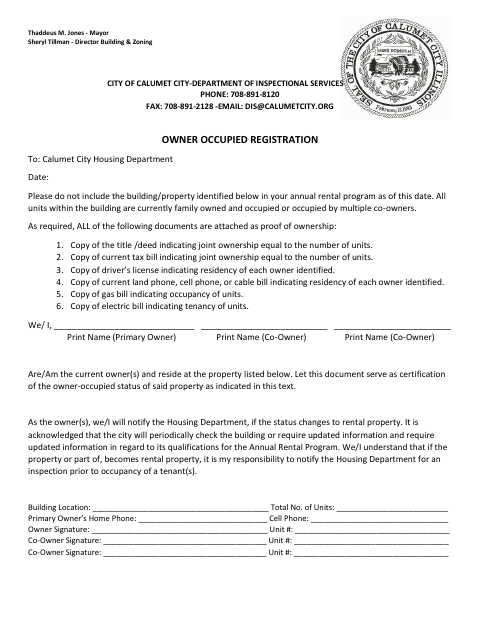
Use this form to ask the Calumet City Housing Department not to include a property in the annual rental program because all units are family-owned and occupied or occupied by multiple co-owners. Owners certify their current residence at the property and agree to notify the department if its status changes to rental property. The form lists documents to attach as proof of ownership and residency and notes that the city may periodically check the building or request updated information.
Who needs it
Owners or co-owners seeking to exclude a family-owned and occupied property from Calumet City’s annual rental program complete this registration and attach the listed proof.
Why it needs a notary
The form has a labeled “Notary Seal and Signature” line; each owner or co-owner signing the certification should sign before a commissioned online notary.
How to get this notarized
- 1
Download The Form
Get the Owner-Occupied Registration form from Calumet City.
- 2
Fill In Property And Owner Details
Enter the date, building location, unit count, owner names, contact details, and unit numbers.
- 3
Gather Supporting Documents
Attach the ownership and residency documents listed on the form.
- 4
Book An Online Notary
Arrange a remote appointment with a commissioned online notary for the owner or co-owners signing.
- 5
Sign On Video
Sign the certification during the online notary session and have the notary complete the seal and signature line.
- 6
Submit To The City
Send the completed form and attachments to the Calumet City Housing Department.
Preview the form
The blank PDF straight from Calumet City. Look it over, then upload your filled copy to start the notary session.

You’ll need ID and a webcam.
A licensed online notary will join you on video, verify your government-issued ID, witness your signature, and apply their seal. You’ll receive the notarized PDF by email when the session ends.
Frequently asked questions
- How do I complete the owner-occupied registration?
- Enter the property and owner details, sign the certification, and attach the listed proof of ownership and residency. Submit the completed form to the Calumet City Housing Department.
- Do I need to attach proof with this form?
- Yes. The form lists copies of a title or deed, current tax bill, each owner’s driver’s license and residency bills, plus gas and electric bills as proof.
- Can I sign this form with an online notary?
- Under 5 ILCS 312, Illinois authorizes electronic and remote notarization for notaries authorized by the state. Illinois also recognizes notarial acts by officers authorized where the act is performed.
- Where do I submit the completed registration?
- The form is addressed to the Calumet City Housing Department. Contact the city about its submission process or any questions about the required attachments; confirm with the city or village if unsure.