
Chicago Heights, IL · Cook County
For-Sale Inspection Form
The For-Sale Inspection Form collects inspection, property, and sale details for a property sale involving a Chicago Heights home.
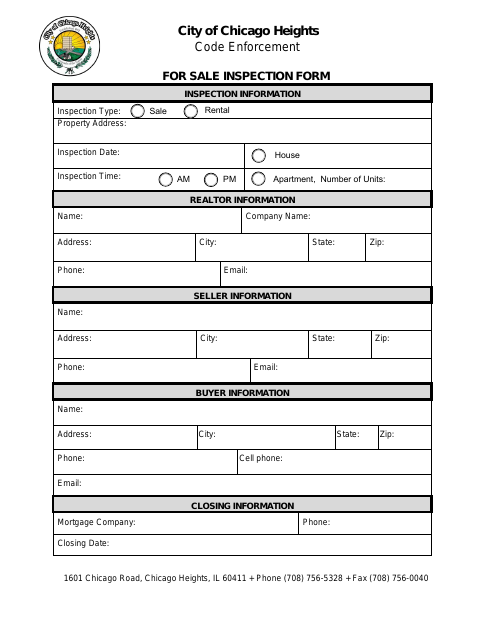
What this form is
This fillable form records inspection information and details about the property, realtor, seller, buyer, and closing. It includes fields for the inspection type, address, date and time, contact information, sale or rental status, dwelling type, and number of units; the form does not state when an inspection is required.
Who needs it
People coordinating a property sale or inspection can use the form to provide property, inspection, participant, and closing details.
How to submit it
The form names City of Chicago Heights Code Enforcement. Submit it to the city department named on the form; check the city website for current contact details.
About notarization
This form has no notary block; it lists no notarized attachment or sworn step, and its fields collect inspection, sale, and contact details.
How to submit this form
- 1
Download the Form
Download the fillable For-Sale Inspection Form.
- 2
Complete the Fields
Enter the inspection, property, realtor, seller, buyer, and closing information requested.
- 3
Review the Form
Check the form for complete details; it lists no attachments.
- 4
Submit to the City
Submit it to the city department named on the form; check the city website for current contact details.
Frequently asked questions
- What information does the For-Sale Inspection Form request?
- It asks for inspection and property details, realtor, seller, and buyer contact information, and closing details. It also includes sale or rental and dwelling type fields.
- How do I submit the For-Sale Inspection Form?
- The form identifies City of Chicago Heights Code Enforcement. Submit it to the city department named on the form; check the city website for current contact details.
- Do I need a notary for the For-Sale Inspection Form?
- No. The form has no notary block and lists no notarized attachment or sworn step; its fields collect inspection, sale, and contact details.