
Cuba, IL · Fulton County
ACH Debit Authorization Form
This form authorizes the City of Cuba to withdraw utility bill payments from a checking or savings account and is completed by the account holder.
- licensed online notary
- ~15 min average
- Notarized PDF emailed
What you’ll need
- Government-issued photo ID
- Webcam-enabled device (laptop or phone)
- This form, ready to upload as a PDF
What this form is
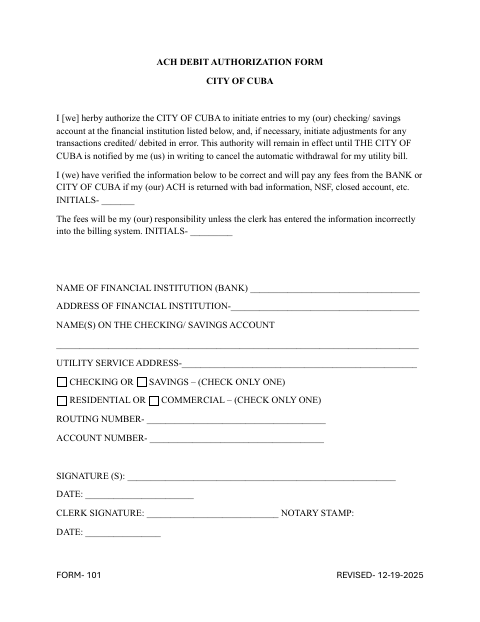
The ACH Debit Authorization Form lets an account holder authorize the City of Cuba to debit a checking or savings account for a utility bill. It collects bank, account, and utility service address details, along with initials acknowledging responsibility for certain returned-payment fees. The authorization remains in effect until the account holder gives the city written notice to cancel automatic withdrawals.
Who needs it
A utility customer who wants the City of Cuba to automatically withdraw bill payments from a checking or savings account should complete this form.
Why it needs a notary
The form has a notary stamp and date field, but shows no jurat or acknowledgment wording; the account holder signs the authorization before the notary.
How to get this notarized
- 1
Download The Form
Get the ACH Debit Authorization Form from the City of Cuba.
- 2
Fill In The Details
Enter the bank, account, and utility service information, and complete the requested initials.
- 3
Book An Online Notary
Arrange an online notarization and have the form ready for your appointment.
- 4
Sign On Video
Sign the form before the notary during your online video session.
- 5
Submit To The City
Send the completed form to the City of Cuba as directed by the city.
Preview the form
The blank PDF straight from Cuba. Look it over, then upload your filled copy to start the notary session.

You’ll need ID and a webcam.
A licensed online notary will join you on video, verify your government-issued ID, witness your signature, and apply their seal. You’ll receive the notarized PDF by email when the session ends.
Frequently asked questions
- How do I complete and notarize the ACH Debit Authorization Form?
- Fill in the requested bank and utility details, then sign before a commissioned online notary. Submit the completed form to the City of Cuba.
- Do I need to sign the form in front of a notary?
- The form includes a notary stamp and date field. Ask the City of Cuba whether it requires notarization and which signatures must be notarized.
- Can I use an online notary for this form?
- Illinois authorizes electronic and remote notarization by its notaries, and recognizes notarial acts performed outside Illinois by an officer authorized where the act takes place. Confirm with the city or village if unsure.
- How do I cancel automatic withdrawals?
- The form says the authorization remains in effect until you notify the City of Cuba in writing to cancel automatic withdrawal for your utility bill.