
Chebanse, IL · Kankakee County
Liquor License Application
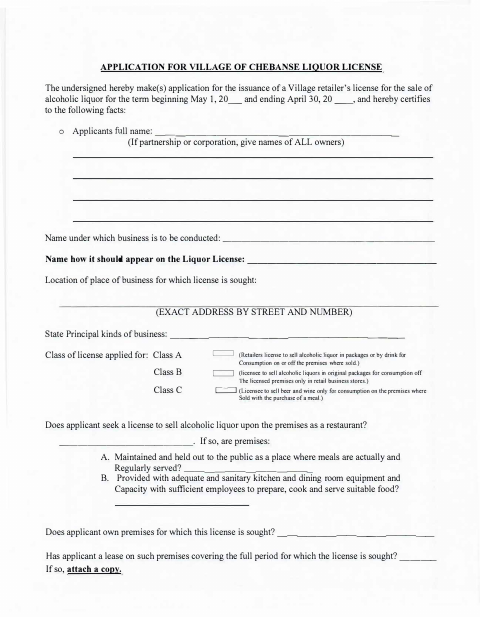
This application requests a Village retailer’s liquor license and collects business, ownership, location, and applicant background details from individuals or business entities seeking to sell alcoholic liquor.
- licensed online notary
- ~15 min average
- Notarized PDF emailed
What you’ll need
- Government-issued photo ID
- Webcam-enabled device (laptop or phone)
- This form, ready to upload as a PDF
What this form is
The application asks for the proposed license term, business location, license class, ownership and operating details, and information about applicants and affiliated people. Applicants swear or affirm that the application is accurate and that they will follow applicable Village, state, and federal laws. Use it when applying for a Village retailer’s liquor license; the form does not state a filing deadline.
Who needs it
Individuals, partnerships, or corporations applying for a Village retailer’s liquor license should complete the application and provide the requested details for owners and other listed people.
Why it needs a notary
The application contains a state jurat stating it is subscribed and sworn to before a notary public; the applicant or applicants sign and swear or affirm the statements.
How to get this notarized
- 1
Download the Application
Get the liquor license application from the Village and review all five pages before completing it.
- 2
Fill In Applicant Details
Provide the requested business, license, ownership, and applicant information. Attach a lease copy if the form requests one.
- 3
Book an Online Notary
Schedule a commissioned online notary for the application’s sworn statement.
- 4
Sign on Video
Show identification as requested and sign and swear or affirm the application during the video appointment.
- 5
Submit to the Village
Follow the Village’s instructions for submitting the completed and notarized application.
Preview the form
The blank PDF straight from Chebanse. Look it over, then upload your filled copy to start the notary session.

You’ll need ID and a webcam.
A licensed online notary will join you on video, verify your government-issued ID, witness your signature, and apply their seal. You’ll receive the notarized PDF by email when the session ends.
Frequently asked questions
- How do I get the liquor license application notarized online?
- Complete the application, then book a commissioned online notary. Sign and swear or affirm the application during the video session, and submit the notarized form as directed by the Village.
- Do I need to sign the application in front of a notary?
- Yes. The form says the application is subscribed and sworn to before a notary public. The applicant or applicants should wait to sign until the notary directs them during the appointment.
- Can this application be notarized remotely?
- Illinois authorizes electronic and remote notarization by notaries commissioned in the state, and recognizes notarial acts performed outside Illinois by officers authorized where the act is performed.
- What information should I prepare before filling out the form?
- The form requests the business name and address, license class, ownership and operating details, and personal information for individual applicants or listed partners, officers, directors, and shareholders.
- How do I submit the notarized application?
- The form does not explain how to submit it or identify a filing deadline. Contact the Village about its current submission instructions and any supporting materials; confirm with the city or village if unsure.
Liquor License Application in other Kankakee County cities
Each city publishes its own version of this form. Pick the city where you’re filing.