
Highwood, IL · Lake County
Restaurant License Application
This application requests a Highwood restaurant license and collects information about the applicant, business, owners, managers, premises, and licensing history for filing with the City Collector.
- licensed online notary
- ~15 min average
- Notarized PDF emailed
What you’ll need
- Government-issued photo ID
- Webcam-enabled device (laptop or phone)
- This form, ready to upload as a PDF
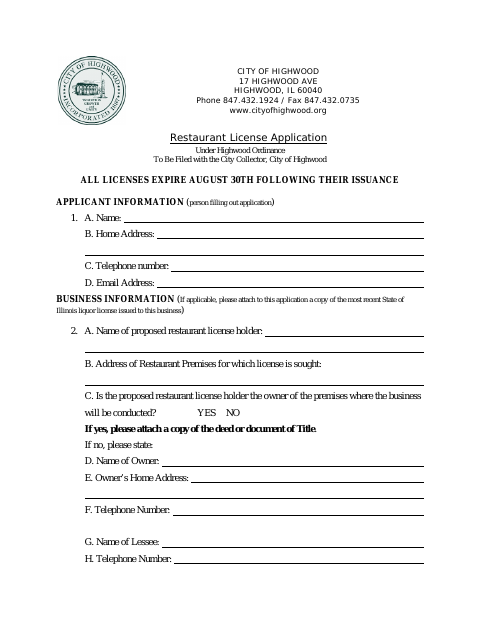
What this form is
The application is for a proposed restaurant seeking a City of Highwood license. It asks for applicant and business details, information about owners and managers, and disclosures about prior licenses, convictions, and certain lawsuits. The applicant must affirm the information is accurate and agree to comply with applicable city ordinances. The form also lists supporting documents and says appearance review approval, building permits, and a certificate of occupancy are conditions before a license is issued.
Who needs it
A person or business seeking a Highwood restaurant license must complete the application and provide the requested information about the business and its owners or managers.
Why it needs a notary
The application carries a subscribed-and-sworn jurat; the applicant signs and swears or affirms the application before the notary.
How to get this notarized
- 1
Download the Application
Download the Highwood Restaurant License Application and review its questions and attachment list.
- 2
Complete the Form
Fill in applicant, business, premises, owner, and manager information, and prepare the applicable supporting documents.
- 3
Book an Online Notary
Arrange an online notarization session with a commissioned online notary.
- 4
Sign on Video
Sign and swear or affirm the application during the video session so the notary can complete the jurat.
- 5
Submit to the City
File the completed application and attachments with the City Collector, and follow the city’s licensing procedures.
Preview the form
The blank PDF straight from Highwood. Look it over, then upload your filled copy to start the notary session.

You’ll need ID and a webcam.
A licensed online notary will join you on video, verify your government-issued ID, witness your signature, and apply their seal. You’ll receive the notarized PDF by email when the session ends.
Frequently asked questions
- How do I get the restaurant license application notarized?
- Complete the application, then meet with a commissioned online notary by video. Sign and swear or affirm the application during the session, following the notary’s instructions.
- Do I need to sign this application in front of a notary?
- Yes. The form includes a subscribed-and-sworn jurat. The applicant must sign and swear or affirm the application before the notary completes the jurat.
- What documents does the application ask me to attach?
- The form lists an assumed name certificate and certificate of incorporation, if applicable, plus a lease copy if applicable, a floor plan including parking information, and liability insurance naming the City as an additional insured.
- Can I submit the application as soon as it is notarized?
- The form says to file the application with the City Collector. It also lists appearance review approval, building permits, and a certificate of occupancy as conditions before a restaurant license is issued. Confirm with the city or village if unsure.