
Staunton, IL · Macoupin County
Company Application for Liquor License
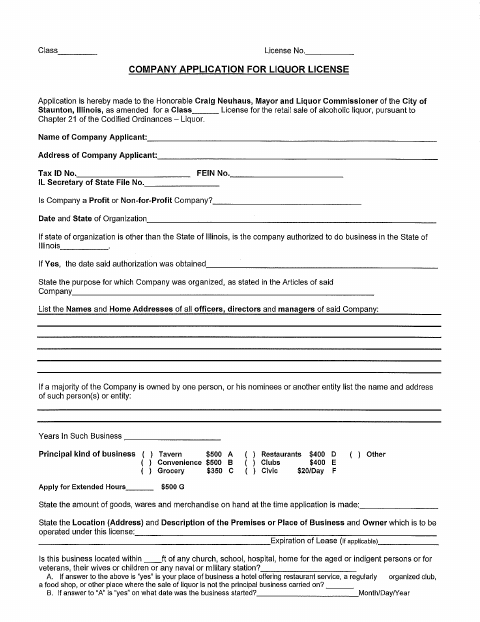
This application requests a retail liquor license for a company and collects business, ownership, premises, manager, and eligibility information from the company applying to operate in Staunton.
- licensed online notary
- ~15 min average
- Notarized PDF emailed
What you’ll need
- Government-issued photo ID
- Webcam-enabled device (laptop or phone)
- This form, ready to upload as a PDF
What this form is
A company uses this form to apply to the Staunton mayor and liquor commissioner for a license to sell alcoholic liquor at retail. It asks about the company, its owners and managers, the proposed business location, and matters such as prior applications or license revocations. The application also requests a recent certificate of good standing and a liquor liability insurance certificate. A company officer or member swears to the accuracy of the information and the company's authorization to apply.
Who needs it
A company seeking a Staunton retail liquor license should complete this application and provide the requested business, ownership, premises, and supporting-document information.
How to get this notarized
- 1
Download the Application
Get the Company Application for Liquor License from the City of Staunton.
- 2
Fill Out the Form
Enter the company, ownership, premises, manager, and eligibility information, and gather the requested supporting documents.
- 3
Book an Online Notary
Schedule a remote session with a commissioned online notary for the company officer or member signing the affidavit.
- 4
Sign on Video
The officer or member signs the sworn statement during the online notary session.
- 5
Submit to the City
Provide the completed, notarized application and requested supporting documents to the City of Staunton.
Preview the form
The blank PDF straight from Staunton. Look it over, then upload your filled copy to start the notary session.

You’ll need ID and a webcam.
A licensed online notary will join you on video, verify your government-issued ID, witness your signature, and apply their seal. You’ll receive the notarized PDF by email when the session ends.
Frequently asked questions
- How do I get this company liquor license application notarized online?
- Complete the application, then book a session with a commissioned online notary. The company officer or member signs during the video session, and the notarized form can then be submitted to the city.
- Do I need to sign the application in front of a notary?
- Yes. The application includes a “Subscribed and Sworn to before me” jurat, so the company officer or member making the affidavit must sign before the notary.
- What supporting documents does the application request?
- The form requests a Certificate of Good Standing issued by the Illinois Secretary of State within the last 90 days and a copy of a liquor liability insurance certificate.
- Can I use an online notary for this form?
- Illinois authorizes electronic and remote notarization by its notaries under the Illinois Notary Public Act (5 ILCS 312) and recognizes acts by officers authorized where performed under the Uniform Recognition of Acknowledgments Act (765 ILCS 30). Confirm with the city or village if unsure.