
Thorntown, IN · Boone County
Rezone/PUD Application
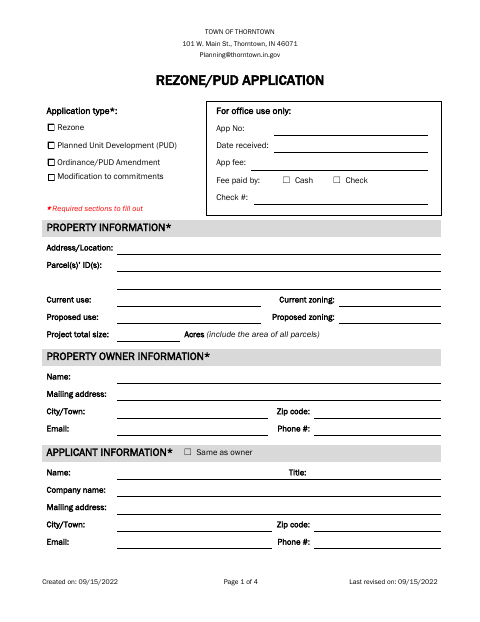
Thorntown property owners or applicants use this four-page form to request a rezoning, Planned Unit Development, ordinance or PUD amendment, or modification to commitments and provide project and property details.
- licensed online notary
- ~15 min average
- Notarized PDF emailed
What you’ll need
- Government-issued photo ID
- Webcam-enabled device (laptop or phone)
- This form, ready to upload as a PDF
What this form is
The application collects property, owner, applicant, contact, and project information, including the proposed use and zoning, project size, and how the project aligns with Thorntown’s Comprehensive Plan. It also includes sworn statements from the applicant and property owner; the owner confirms ownership and consents to filing. Use it to submit a rezoning or PUD request, amendment, or modification to commitments to the Town of Thorntown.
Who needs it
Property owners or applicants seeking a Thorntown rezoning, Planned Unit Development, ordinance or PUD amendment, or modification to commitments should complete this application.
Why it needs a notary
The form has sworn applicant and owner affidavit blocks; the applicant and each property owner with an interest sign and swear or acknowledge before the notary.
How to get this notarized
- 1
Download the Application
Get the Town of Thorntown Rezone/PUD Application and review its four pages, including both affidavit sections.
- 2
Fill Out the Form
Complete the required property, owner, applicant, project, and Comprehensive Plan sections.
- 3
Book an Online Notary
Arrange a remote online notarization session for the applicant and property owner affidavit signatures.
- 4
Sign on Video
Sign and swear or acknowledge the affidavit statements during the notary session.
- 5
Submit to the Town
Submit the completed application and any required owner statements to the Town of Thorntown.
Preview the form
The blank PDF straight from Thorntown. Look it over, then upload your filled copy to start the notary session.

You’ll need ID and a webcam.
A licensed online notary will join you on video, verify your government-issued ID, witness your signature, and apply their seal. You’ll receive the notarized PDF by email when the session ends.
Frequently asked questions
- How do I get the affidavits notarized online?
- Complete the application, then book a session with a commissioned online notary. Sign the applicant and owner affidavit sections during the video session, following the notary’s instructions.
- Do I need every property owner to sign?
- The form says a signature from each party with an interest in the property is required. If an owner’s signature cannot be obtained on the application, that owner must provide a notarized statement acknowledging and consenting to the filing.
- Can I use an online notary for this form?
- Indiana permits its notaries with a remote notary public endorsement to perform remote online notarizations under IC 33-42-17. IC 33-42-9-8 recognizes notarial acts by an authorized officer of another state. Confirm with the city or town if unsure.
- What information does the application ask for?
- It asks for property and parcel details, current and proposed uses and zoning, owner and applicant contacts, project description, and compliance with Thorntown’s Comprehensive Plan.