
Whitestown, IN · Boone County
Application and Certificate for Payment
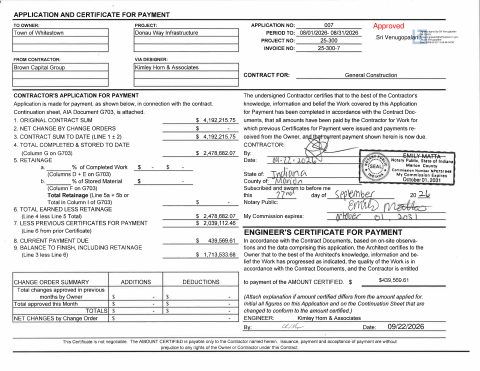
This payment application records completed and stored project work, prior payments, retainage, and the current amount due; the contractor submits it to the Town of Whitestown for the Donau Way infrastructure project.
- licensed online notary
- ~15 min average
- Notarized PDF emailed
What you’ll need
- Government-issued photo ID
- Webcam-enabled device (laptop or phone)
- This form, ready to upload as a PDF
What this form is
The form requests payment under the General Construction contract for the Town of Whitestown Donau Way Infrastructure project. The contractor certifies that the work covered by the application follows the contract documents and that amounts due for previously paid work have been paid. An engineer’s certificate accompanies the request, and a continuation sheet itemizes work, scheduled values, completed amounts, and the balance to finish.
Who needs it
The contractor named on the form completes and submits it to request payment for work on the Town of Whitestown Donau Way Infrastructure project.
Why it needs a notary
The form carries a subscribed-and-sworn jurat; the contractor’s authorized signer signs the payment certification before the notary, who completes the jurat.
How to get this notarized
- 1
Download The Form
Get the Town of Whitestown Application and Certificate for Payment and its continuation sheet.
- 2
Complete The Application
Enter the project and payment details, review the amounts, and prepare the contractor certification.
- 3
Book An Online Notary
Schedule a session with a commissioned online notary for the contractor’s signer.
- 4
Sign On Video
Sign the contractor certification during the video session and have the notary complete the jurat.
- 5
Submit To The Town
Send the notarized application, continuation sheet, and any required supporting materials to the project team.
Preview the form
The blank PDF straight from Whitestown. Look it over, then upload your filled copy to start the notary session.

You’ll need ID and a webcam.
A licensed online notary will join you on video, verify your government-issued ID, witness your signature, and apply their seal. You’ll receive the notarized PDF by email when the session ends.
Frequently asked questions
- How do I get this payment application notarized online?
- Complete the application, book with a commissioned online notary, and sign the contractor certification during the video session. Submit the notarized form with its continuation sheet and supporting materials.
- Do I need to sign this form in front of a notary?
- Yes. The form includes a subscribed-and-sworn jurat for the contractor’s certification. The signer should leave the notary section for the notary to complete.
- Can I use a commissioned online notary?
- Indiana authorizes its own notaries to perform remote online notarizations with a remote notary public endorsement under IC 33-42-17; that endorsement took effect July 1, 2020. Confirm with the city or town if unsure.
- What should I submit with the application?
- The form states that an AIA Document G703 continuation sheet is attached. Check the contract or project instructions for any additional submission requirements.