
Fortville, IN · Hancock County
Authorization for the Release of Account Information
This authorization lets a utility account holder permit another person to obtain personal account information, and is completed by the account holder for the utility handling the account.
- licensed online notary
- ~15 min average
- Notarized PDF emailed
What you’ll need
- Government-issued photo ID
- Webcam-enabled device (laptop or phone)
- This form, ready to upload as a PDF
What this form is
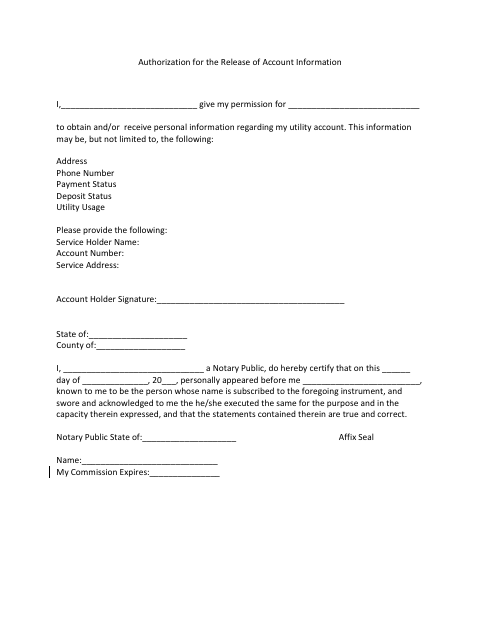
The form gives a named person permission to obtain or receive personal information about the signer’s utility account, including address, phone number, payment status, deposit status, and utility usage. It also asks for the service holder’s name, account number, and service address. Use it when an account holder wants to authorize someone else to access those details; the form includes a notarial certificate for the signer’s appearance.
Who needs it
A utility account holder who wants another person to obtain or receive personal information about the account can complete this authorization.
Why it needs a notary
The form carries a notarial certificate stating the signer appeared, swore, and acknowledged execution; the account holder signs before the notary.
How to get this notarized
- 1
Download the Form
Get the Authorization for the Release of Account Information form.
- 2
Fill In Account Details
Enter the authorized person’s name, service holder name, account number, and service address.
- 3
Book an Online Notary
Schedule an appointment with a commissioned online notary.
- 4
Sign on Video
Appear by video and sign when directed by the notary.
- 5
Submit to the City
Send the completed authorization to the city utility office or utility handling the account.
Preview the form
The blank PDF straight from Fortville. Look it over, then upload your filled copy to start the notary session.

You’ll need ID and a webcam.
A licensed online notary will join you on video, verify your government-issued ID, witness your signature, and apply their seal. You’ll receive the notarized PDF by email when the session ends.
Frequently asked questions
- How do I authorize someone to receive my utility account information?
- Complete the form with the authorized person’s name and your service holder name, account number, and service address. Sign before a notary, then provide the completed authorization to the utility handling the account.
- Do I need to sign this form before a notary?
- Yes. The form includes a notarial certificate stating that the signer personally appeared, swore, and acknowledged executing the authorization.
- Can I use a commissioned online notary?
- Indiana authorizes remote notarization by a commissioned online notary with a remote notary public endorsement under IC 33-42-17. IC 33-42-9-8 recognizes notarial acts performed by a notary public or other authorized officer of another state.
- Where should I send the completed authorization?
- The form does not specify where to submit it. Ask the utility handling your account where it accepts account-information authorizations; confirm with the city or town if unsure.