
Burns Harbor, IN · Porter County
Road Overweight Permit
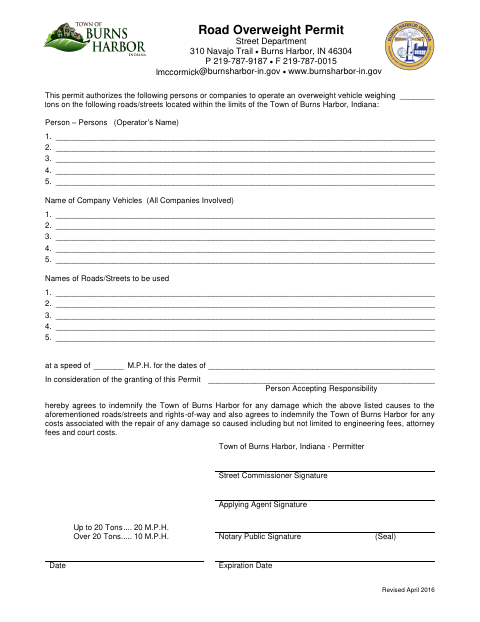
This permit identifies operators, companies, roads, vehicle weight, speed, and dates for overweight vehicle travel within Burns Harbor, and is filed by the person or company seeking permission.
- licensed online notary
- ~15 min average
- Notarized PDF emailed
What you’ll need
- Government-issued photo ID
- Webcam-enabled device (laptop or phone)
- This form, ready to upload as a PDF
What this form is
Use this form to request authorization for named persons or companies to operate an overweight vehicle on listed Burns Harbor roads or streets, at a specified speed and during specified dates. The person accepting responsibility agrees to indemnify the Town for road, street, or right-of-way damage and related repair costs. Complete the operator, company, route, weight, speed, and date details, then submit the signed permit to the Town of Burns Harbor for its permit process.
Who needs it
A person or company seeking Town of Burns Harbor authorization to operate an overweight vehicle on specified town roads or streets should complete this permit.
Why it needs a notary
The form carries a Notary Public signature and seal block; the person accepting responsibility or applying agent should sign the permit before the notary.
How to get this notarized
- 1
Download the Permit
Get the Burns Harbor Road Overweight Permit and review its fields and Notary Public signature and seal block.
- 2
Fill In the Permit Details
Enter the operators, companies, roads or streets, vehicle weight, speed, dates, and responsibility information.
- 3
Book an Online Notary
Arrange a remote online notarization with a commissioned online notary before signing the form.
- 4
Sign on Video
Sign the permit during the online notary session and complete the notarial step shown on the form.
- 5
Submit to the Town
Send the completed permit to the Town of Burns Harbor using its current submission instructions.
Preview the form
The blank PDF straight from Burns Harbor. Look it over, then upload your filled copy to start the notary session.

You’ll need ID and a webcam.
A licensed online notary will join you on video, verify your government-issued ID, witness your signature, and apply their seal. You’ll receive the notarized PDF by email when the session ends.
Frequently asked questions
- How do I complete the Burns Harbor Road Overweight Permit?
- List the operators, companies, roads or streets, vehicle weight, speed, and dates. The person accepting responsibility agrees to cover specified damage and related repair costs. Sign before a notary, then submit the permit to the Town.
- Do I need to sign this permit in front of a notary?
- The form includes a Notary Public signature and seal block. The person accepting responsibility or applying agent should sign before the notary; confirm with the city or town if unsure.
- Can I use a remote online notary for this form?
- Indiana authorizes its notaries to perform remote online notarizations with a remote notary public endorsement under IC 33-42-17. Book a commissioned online notary and follow the notary's instructions for signing on video.
- Where do I submit the completed permit?
- The form is issued by the Burns Harbor Street Department and identifies the Town of Burns Harbor as the permitter. Contact the Town for its current submission instructions and any additional requirements.