
Riley, IN · Vigo County
Solicitor Permit Application
The Solicitor Permit Application collects applicant, employer, business, and canvassing details for people seeking permission to solicit or canvass in Riley.
- licensed online notary
- ~15 min average
- Notarized PDF emailed
What you’ll need
- Government-issued photo ID
- Webcam-enabled device (laptop or phone)
- This form, ready to upload as a PDF
What this form is
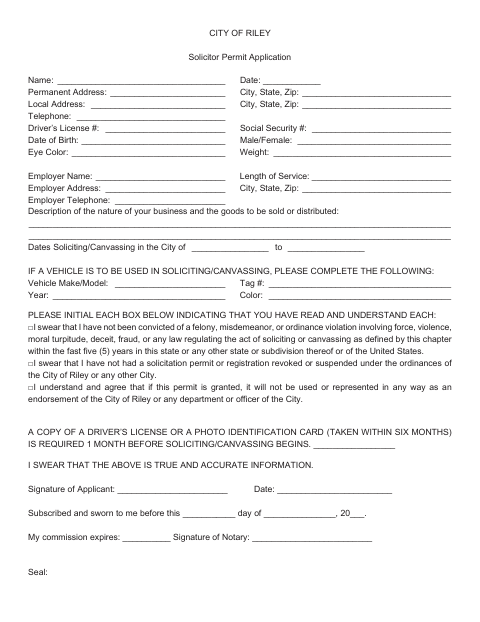
Use this application to provide personal and employer information, describe the goods or services you plan to sell or distribute, and list the dates you intend to solicit or canvass in Riley. Complete the vehicle section if you will use a vehicle. The applicant must initial statements about their history and understanding of the permit, swear that the information is true, and provide a driver’s license copy or recent photo identification one month before soliciting or canvassing begins.
Who needs it
Anyone applying to solicit or canvass in Riley should complete this form and provide the required identification copy before activities begin.
Why it needs a notary
The form has a subscribed-and-sworn jurat: the applicant signs and swears the application is true before the notary, who signs and records the commission expiration.
How to get this notarized
- 1
Download the Application
Get the Riley Solicitor Permit Application and review its fields and sworn statements.
- 2
Fill In the Form
Provide applicant, employer, business, and canvassing details. Complete vehicle information if a vehicle will be used, and initial each statement.
- 3
Book an Online Notary
Arrange an appointment with a commissioned online notary before signing the sworn statement.
- 4
Sign on Video
Sign and swear that the information is true during the online notary session.
- 5
Submit to the City
Submit the completed application to the City of Riley and provide the required identification copy before soliciting or canvassing begins.
Preview the form
The blank PDF straight from Riley. Look it over, then upload your filled copy to start the notary session.

You’ll need ID and a webcam.
A licensed online notary will join you on video, verify your government-issued ID, witness your signature, and apply their seal. You’ll receive the notarized PDF by email when the session ends.
Frequently asked questions
- How do I complete the solicitor permit application?
- Fill in the applicant, employer, business, and canvassing details; complete the vehicle section if applicable; initial the statements; then sign and swear to the application before a notary.
- Do I need to sign this application in front of a notary?
- Yes. The form includes a subscribed-and-sworn statement and a notary signature and commission-expiration line, so sign and swear to the information before the notary.
- Can I sign the application with an online notary?
- Indiana authorizes its notaries to perform remote online notarizations with a remote notary public endorsement under IC 33-42-17. IC 33-42-9-8 recognizes acts by notaries or other authorized officers of another state.
- When should I provide identification?
- The application says a copy of a driver’s license or photo identification taken within six months is required one month before soliciting or canvassing begins. Confirm with the city or town if unsure.