
Casey, IA · Guthrie County
Citizen’s Input Form
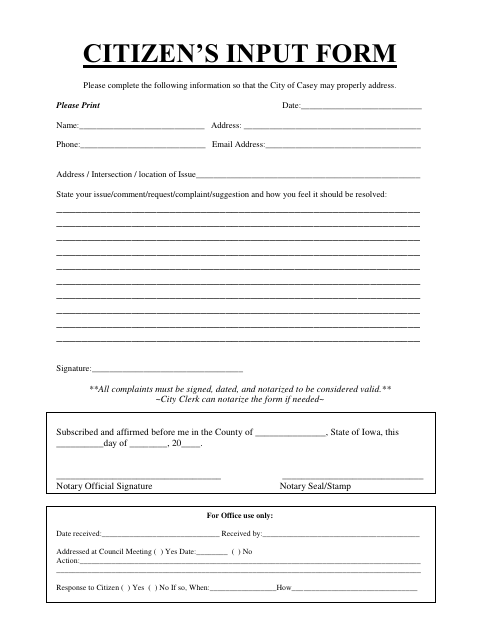
The Citizen’s Input Form lets Casey residents submit an issue, comment, request, complaint, or suggestion to the city, with contact details and a proposed resolution.
- licensed online notary
- ~15 min average
- Notarized PDF emailed
What you’ll need
- Government-issued photo ID
- Webcam-enabled device (laptop or phone)
- This form, ready to upload as a PDF
What this form is
Use this form to share an issue, comment, request, complaint, or suggestion with the City of Casey and explain how you feel it should be resolved. The form asks for your contact information and the location of the issue. The city states that complaints must be signed, dated, and notarized to be considered valid; the City Clerk can notarize the form if needed.
Who needs it
Casey residents who want to bring an issue, comment, request, complaint, or suggestion to the city can use this form to provide details and contact information.
Why it needs a notary
The form carries a subscribed-and-affirmed jurat; the citizen submitting the complaint signs and affirms it before a notary, then the notary signs and applies a seal or stamp.
How to get this notarized
- 1
Download the Form
Get the Citizen’s Input Form from the City of Casey.
- 2
Fill In the Form
Add your contact details, the issue location, your comment or complaint, and how you feel it should be resolved.
- 3
Book an Online Notary
Arrange a video appointment with a commissioned online notary for your complaint’s jurat.
- 4
Sign on Video
Sign and affirm the complaint before the notary during your online appointment.
- 5
Submit to the City
Send the completed form to the City of Casey using its accepted submission method.
Preview the form
The blank PDF straight from Casey. Look it over, then upload your filled copy to start the notary session.

You’ll need ID and a webcam.
A licensed online notary will join you on video, verify your government-issued ID, witness your signature, and apply their seal. You’ll receive the notarized PDF by email when the session ends.
Frequently asked questions
- How do I submit a notarized complaint to Casey?
- Complete the form, sign and date your complaint before a notary, then submit it to the City of Casey. The form says the City Clerk can notarize it if needed.
- Do I need to notarize every Citizen’s Input Form?
- The form specifically says complaints must be signed, dated, and notarized to be considered valid. It does not state that every type of comment or request must be notarized.
- Can I complete the notarization online?
- Iowa law authorizes remote online notarization by a commissioned online notary under Iowa Code §9B.14A. Check that the city will accept the remotely notarized form before submitting it.
- Where do I send the completed form?
- The form is for the City of Casey and includes a space for office use to record receipt and council-meeting follow-up. Contact the city about its preferred submission method; confirm with the city if unsure.