
Spring Hill, KS · Johnson County
Special Event Application
This four-page application lets event organizers request permission to hold a special event in Spring Hill and provide event, insurance, indemnification, and public-safety information.
- licensed online notary
- ~15 min average
- Notarized PDF emailed
What you’ll need
- Government-issued photo ID
- Webcam-enabled device (laptop or phone)
- This form, ready to upload as a PDF
What this form is
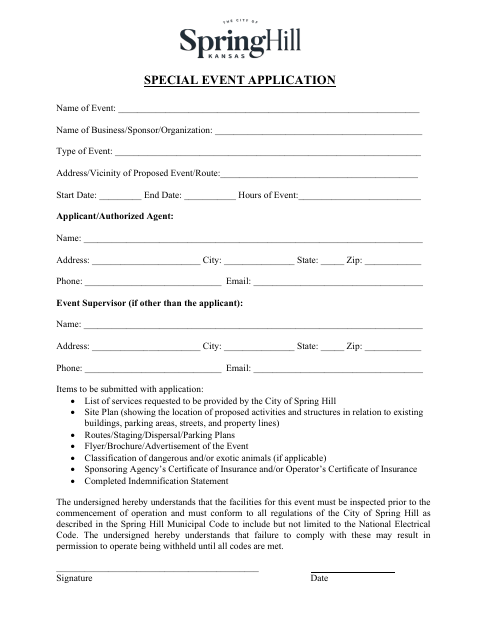
Event organizers submit this application to the City of Spring Hill with requested services, plans, event materials, insurance documentation, and a completed indemnification statement. The form also includes insurance requirements and a public-safety checklist for organizers to complete. The application states that event facilities must be inspected before operations begin and comply with city regulations; failure to comply may delay permission to operate.
Who needs it
An event operator, sponsor, or authorized applicant seeking city permission to hold a special event in Spring Hill should complete and submit the application and required materials.
Why it needs a notary
The indemnification statement includes a notarial acknowledgment; the officer named for the operator or sponsor entity signs before a notary, who completes the acknowledgment.
How to get this notarized
- 1
Download The Application
Get the Special Event Application from the City of Spring Hill.
- 2
Complete The Form
Enter event and applicant details, prepare the listed supporting materials, and complete the indemnification statement and safety checklist.
- 3
Book An Online Notary
Arrange an online notarization for the officer signing the indemnification statement.
- 4
Sign On Video
The officer signs the indemnification statement during the online notary session and receives the notarized document.
- 5
Submit To The City
Submit the completed application and required supporting materials to the City of Spring Hill.
Preview the form
The blank PDF straight from Spring Hill. Look it over, then upload your filled copy to start the notary session.

You’ll need ID and a webcam.
A licensed online notary will join you on video, verify your government-issued ID, witness your signature, and apply their seal. You’ll receive the notarized PDF by email when the session ends.
Frequently asked questions
- How do I complete the notarized part of this application?
- Have the officer named for the operator or sponsor sign the indemnification statement before a notary. The notary completes the acknowledgment in that section.
- Do I need to submit plans and insurance information?
- The application lists a site plan, routes, staging, dispersal and parking plans, event materials, insurance documentation, and a completed indemnification statement among its required submissions.
- Can I sign the indemnification statement with a commissioned online notary?
- Kansas law authorizes remote online notarization by Kansas notaries, and Kansas recognizes notarial acts performed by authorized officers of other states. Confirm the city will accept your notarized document if unsure.
- What else is included in the application?
- The four-page packet includes insurance regulations and a public-safety checklist covering emergency procedures, site access, fire safety, food vendors, and whether liquor or cereal malt beverages will be served.