
Rossville, KS · Shawnee County
Positive Identification Form for Utility Signup
This form verifies a utility applicant’s identity using personal information and copies of identification documents; the applicant completes it for the City of Rossville’s utility signup process.
- licensed online notary
- ~15 min average
- Notarized PDF emailed
What you’ll need
- Government-issued photo ID
- Webcam-enabled device (laptop or phone)
- This form, ready to upload as a PDF
What this form is
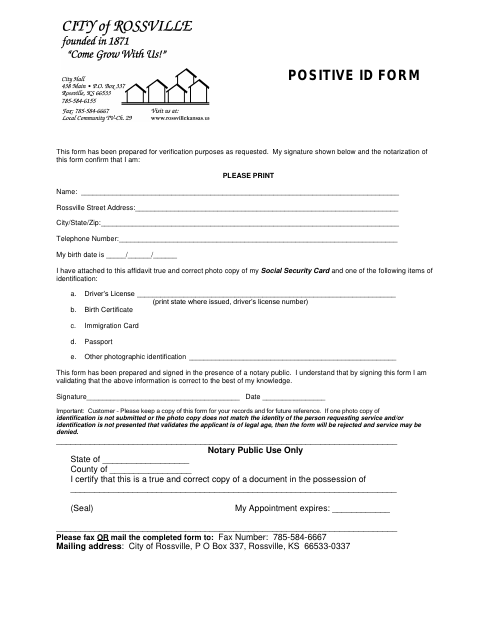
The form records the applicant’s name, Rossville street address, contact details, and birth date, and asks for a photocopy of a Social Security card plus one listed form of identification. The applicant signs it before a notary and submits it to the city by fax or mail. The form warns that missing or mismatched identification, or identification that does not validate legal age, may result in rejection and denial of service.
Who needs it
A person requesting utility service from the City of Rossville who is asked to verify identity with this form needs to complete and submit it.
Why it needs a notary
The applicant signs before a notary; the form also has a notary-use copy-certification block for certifying a true and correct copy.
How to get this notarized
- 1
Download the Form
Get the Positive Identification Form for Utility Signup from the City of Rossville.
- 2
Fill In Your Information
Complete the personal and contact information, and prepare the identification photocopies requested on the form.
- 3
Book an Online Notary
Arrange an online notarization with a commissioned online notary.
- 4
Sign on Video
Sign the form in the notary’s presence during your online session.
- 5
Submit It to the City
Fax or mail the completed form and required copies to the contact listed on the form.
Preview the form
The blank PDF straight from Rossville. Look it over, then upload your filled copy to start the notary session.

You’ll need ID and a webcam.
A licensed online notary will join you on video, verify your government-issued ID, witness your signature, and apply their seal. You’ll receive the notarized PDF by email when the session ends.
Frequently asked questions
- How do I complete the Positive Identification Form?
- Print your information, attach a photocopy of your Social Security card and one listed identification document, then sign before a notary. Keep a copy and fax or mail the completed form to the city.
- Do I need to bring identification to the notary?
- The form asks you to attach a photocopy of your Social Security card and one listed identification document. It also warns that identification must validate the applicant’s identity and legal age.
- Can I sign this form with an online notary?
- Kansas law authorizes remote notarization by a commissioned online notary under K.S.A. 53-5a15. Confirm with the city if unsure whether it accepts a remotely notarized form.
- Where do I send the completed form?
- The form lists fax number 785-584-6667 or mail to City of Rossville, P.O. Box 337, Rossville, KS 66533-0337.