
Hazard, KY · Perry County
Alcoholic Beverage Control Basic Application
This five-page application lets new applicants request one or more City of Hazard alcoholic beverage licenses and provide business, license, and sworn applicant information.
- licensed online notary
- ~15 min average
- Notarized PDF emailed
What you’ll need
- Government-issued photo ID
- Webcam-enabled device (laptop or phone)
- This form, ready to upload as a PDF
What this form is
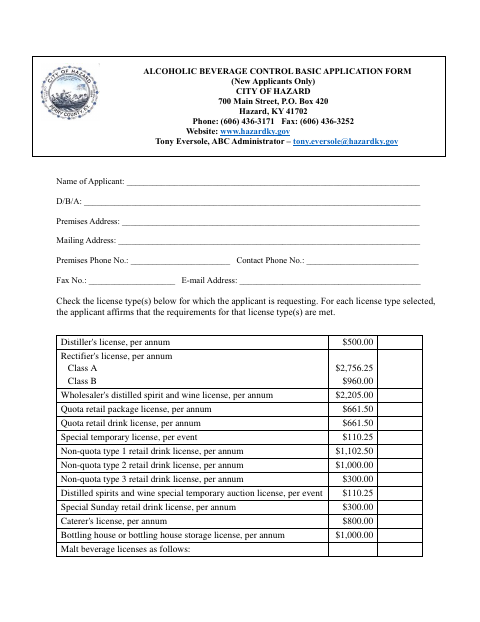
New applicants use this form to request the alcoholic beverage license types they need for their Hazard premises, list the requested license fees, and affirm that the application information is true. The form also includes an affidavit and fire-code verification for restaurant by-the-drink applications. Applicants must include the required inspection forms and other checklist items, and may not begin alcohol activity until the city and state licenses have been issued.
Who needs it
A new applicant seeking a City of Hazard license to manufacture, sell, serve, or distribute alcoholic or malt beverages must complete the application and its applicable sections.
Why it needs a notary
The applicant signs before a notary under a combined sworn-and-acknowledged certificate; the form also includes a separate applicant affidavit without its own notary block.
How to get this notarized
- 1
Download The Application
Get the City of Hazard Alcoholic Beverage Control Basic Application for new applicants.
- 2
Complete The Applicable Sections
Enter applicant and premises details, select requested license types, and complete the applicable affidavit and restaurant fire-code sections.
- 3
Gather Required Materials
Use the checklist to prepare the license fee, state license copy, inspection forms, and other listed documents.
- 4
Book An Online Notary
Arrange a remote notarization with a commissioned online notary before signing the applicant portion.
- 5
Sign On Video
Sign the application during the online notary session and complete the notarial certificate.
- 6
Submit To The City
Send the signed application and required materials to the City of Hazard as directed by its ABC Administrator.
Preview the form
The blank PDF straight from Hazard. Look it over, then upload your filled copy to start the notary session.

You’ll need ID and a webcam.
A licensed online notary will join you on video, verify your government-issued ID, witness your signature, and apply their seal. You’ll receive the notarized PDF by email when the session ends.
Frequently asked questions
- How do I submit the Hazard alcohol license application?
- Complete the application, sign it before a notary, and gather the required license fee, inspection forms, and checklist documents. Contact the City of Hazard ABC Administrator about filing.
- Do I need to include inspection forms?
- Yes. The application says all proper inspection forms must accompany it, including zoning, fire, building, and health inspections. Its checklist also lists additional forms and documents.
- Can I sign the application with an online notary?
- Kentucky law authorizes its notaries to register as online notaries under KRS 423.355. A commissioned online notary can notarize remotely; confirm the City of Hazard accepts the notarized form before signing.
- When can I begin alcohol activity?
- The application says you may not begin alcohol activity until a license has been issued by both the City of Hazard and the state.
- What if I am unsure about filing requirements?
- The form lists the City of Hazard ABC Administrator and a checklist of required materials. Confirm with the city or county clerk if unsure.