
Simpsonville, KY · Shelby County
Authorization for the Release of Information
This authorization lets an applicant for a Simpsonville Police Department position permit the release of employment, education, medical, credit, and other records for a background check.
- licensed online notary
- ~15 min average
- Notarized PDF emailed
What you’ll need
- Government-issued photo ID
- Webcam-enabled device (laptop or phone)
- This form, ready to upload as a PDF
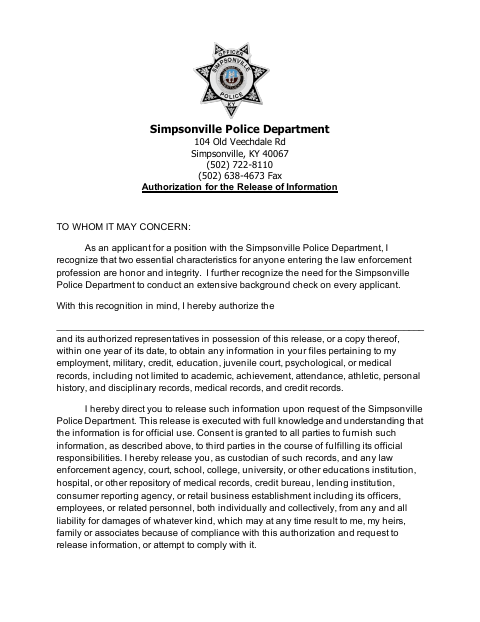
What this form is
Applicants for positions with the Simpsonville Police Department use this form to authorize the release of records for an extensive background check. The applicant provides identifying and contact information, signs the authorization before a notary, and gives the release to the department for its official use.
Who needs it
Applicants for a position with the Simpsonville Police Department use this form to authorize the department’s background check and request records from listed custodians.
Why it needs a notary
The form has a sworn-to-and-signed-before-me jurat block; the applicant signs the authorization before the notary, who completes the certificate and commission details.
How to get this notarized
- 1
Download the Form
Get the Authorization for the Release of Information form for Simpsonville Police Department applicants.
- 2
Fill In the Applicant Details
Enter the authorized organization and requested applicant information. Leave the notary certificate for the notary to complete.
- 3
Book an Online Notary
Arrange an online notarization and confirm with the department that it accepts a remotely notarized form.
- 4
Sign on Video
Sign the authorization in the online notary’s presence so the notary can complete the sworn certificate.
- 5
Submit to the Department
Provide the completed authorization to the Simpsonville Police Department for its background check.
Preview the form
The blank PDF straight from Simpsonville. Look it over, then upload your filled copy to start the notary session.

You’ll need ID and a webcam.
A licensed online notary will join you on video, verify your government-issued ID, witness your signature, and apply their seal. You’ll receive the notarized PDF by email when the session ends.
Frequently asked questions
- How do I complete the background information release?
- Fill in the requested applicant details and the organization authorized to release records. Sign the form before a notary, then provide the completed authorization to the Simpsonville Police Department.
- Do I need to sign this form in front of a notary?
- Yes. The form includes a sworn-to-and-signed-before-me certificate and a space for the notary’s signature, printed name, seal, and commission expiration.
- Can I use an online notary for this form?
- Kentucky authorizes its notaries to register as online notaries and recognizes certain notarial acts by authorized officers of other states. Confirm with the department that it accepts remote notarization before booking.
- What records does this authorization cover?
- The form lists employment, military, credit, education, juvenile court, psychological, and medical records, along with related academic, attendance, personal history, and disciplinary information.
- Who should I contact if I am unsure about the form?
- The form identifies the Simpsonville Police Department as the applicant’s contact for questions about the release. Confirm with the city or county clerk if unsure.