
Livermore Falls, ME · Androscoggin County
Request for Name Addition or Deletion on a Registration
This form asks to add or delete a person on a vehicle registration, and is completed by the current registrant and the person being added or deleted.
- licensed online notary
- ~15 min average
- Notarized PDF emailed
What you’ll need
- Government-issued photo ID
- Webcam-enabled device (laptop or phone)
- This form, ready to upload as a PDF
What this form is
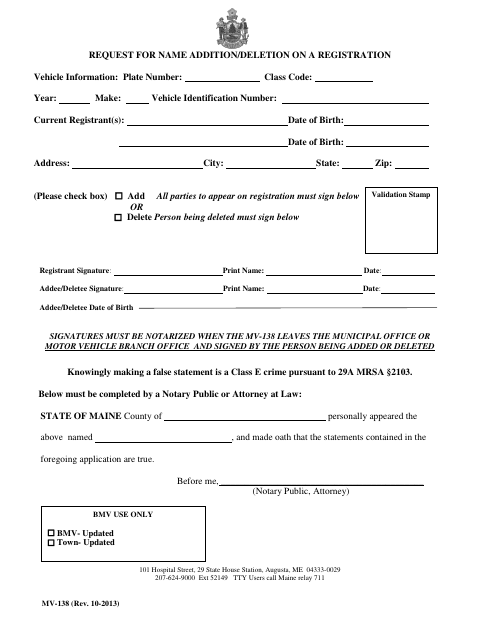
Use the MV-138 to request an addition or deletion on a vehicle registration. It collects vehicle and registrant details, and the form directs all parties to appear on the registration to sign for an addition, or the person being deleted to sign for a deletion. Signatures must be notarized when the form leaves the municipal office or Motor Vehicle Branch office.
Who needs it
Current registrants requesting a name addition or deletion use this form, with signatures from all parties appearing on the registration for an addition or the person being deleted.
Why it needs a notary
The form contains a Maine state jurat requiring the signer to appear before a notary or attorney and swear that the application statements are true.
How to get this notarized
- 1
Download the MV-138
Get the Request for Name Addition/Deletion on a Registration form.
- 2
Fill In the Form
Provide vehicle and registrant details, then check the box for adding or deleting a person.
- 3
Book an Online Notary
Arrange a session with a commissioned online notary for the required jurat.
- 4
Sign on Video
Appear before the notary and swear that the statements in the application are true.
- 5
Submit the Form
Deliver the notarized MV-138 to the municipal office or Motor Vehicle Branch office.
Preview the form
The blank PDF straight from Livermore Falls. Look it over, then upload your filled copy to start the notary session.

You’ll need ID and a webcam.
A licensed online notary will join you on video, verify your government-issued ID, witness your signature, and apply their seal. You’ll receive the notarized PDF by email when the session ends.
Frequently asked questions
- How do I complete the MV-138?
- Enter the vehicle and registrant information, select add or delete, and obtain the required notarized signatures. Then submit the form to the municipal office or Motor Vehicle Branch office.
- Do I need a notary for this form?
- Yes. The form says signatures must be notarized when the MV-138 leaves the municipal office or Motor Vehicle Branch office. Its jurat requires the signer to swear the statements are true.
- Can I sign the MV-138 with an online notary?
- Maine law, 4 M.R.S. §1915, authorizes remote notarization by a commissioned online notary for a remotely located individual. Confirm the receiving office will accept the completed form.
- Where do I submit the completed form?
- The form identifies the municipal office and Motor Vehicle Branch office. Confirm with the town, city, or county registry of deeds if unsure.