
Sandy River Plantation, ME · Franklin County
Sole Proprietor Certificate for Adopting a Business Name
This certificate records a sole proprietor’s intent to conduct business under a name other than the owner’s own, for filing with the municipal clerk where the business will operate.
- licensed online notary
- ~15 min average
- Notarized PDF emailed
What you’ll need
- Government-issued photo ID
- Webcam-enabled device (laptop or phone)
- This form, ready to upload as a PDF
What this form is
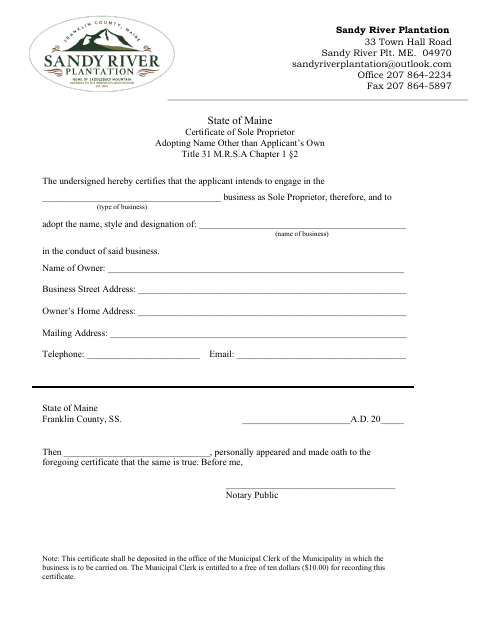
The certificate identifies the business name, type of business, owner, and contact and address details, and includes an oath that the information is true. The form says to deposit it with the municipal clerk of the municipality where the business will be carried on, and notes a $10 recording fee.
Who needs it
A sole proprietor intending to conduct business under a name other than their own should complete this certificate and file it with the municipal clerk where the business will operate.
How to get this notarized
- 1
Download the Certificate
Get the sole proprietor certificate from the Sandy River Plantation form source.
- 2
Fill In the Business Details
Enter the business type and name, owner information, addresses, telephone, and email.
- 3
Book an Online Notary
Arrange a remote notarization and check with the municipal clerk about accepting the notarized certificate.
- 4
Take the Oath on Video
Appear before the notary, swear the certificate is true, and complete the jurat.
- 5
Submit to the Municipal Clerk
Deposit the certificate with the clerk where the business will be carried on and account for the form’s stated recording fee.
Preview the form
The blank PDF straight from Sandy River Plantation. Look it over, then upload your filled copy to start the notary session.

You’ll need ID and a webcam.
A licensed online notary will join you on video, verify your government-issued ID, witness your signature, and apply their seal. You’ll receive the notarized PDF by email when the session ends.
Frequently asked questions
- How do I file this sole proprietor certificate?
- Complete the certificate, swear that its statements are true before a notary, then deposit it with the municipal clerk of the municipality where the business will be carried on. The form notes a $10 recording fee.
- Do I need to sign this form in front of a notary?
- Yes. The certificate says the applicant personally appeared and made oath that it is true, with a notary public completing the jurat.
- Can I use an online notary for this form?
- Maine law, 4 M.R.S. ch. 39, §1915, authorizes remote notarization by a commissioned online notary, subject to its exceptions. Ask the municipal clerk whether it will accept this remotely notarized certificate.
- Where should I file the completed certificate?
- The form directs you to deposit it with the municipal clerk of the municipality where the business will be carried on. Confirm with the town, city, or county registry of deeds if unsure.