
Boothbay, ME · Lincoln County
Commercial Resident Shellfish License Application
This application is for people seeking a resident commercial shellfish license from the Town of Boothbay and includes a sworn statement affirming their Boothbay domicile.
- licensed online notary
- ~15 min average
- Notarized PDF emailed
What you’ll need
- Government-issued photo ID
- Webcam-enabled device (laptop or phone)
- This form, ready to upload as a PDF
What this form is
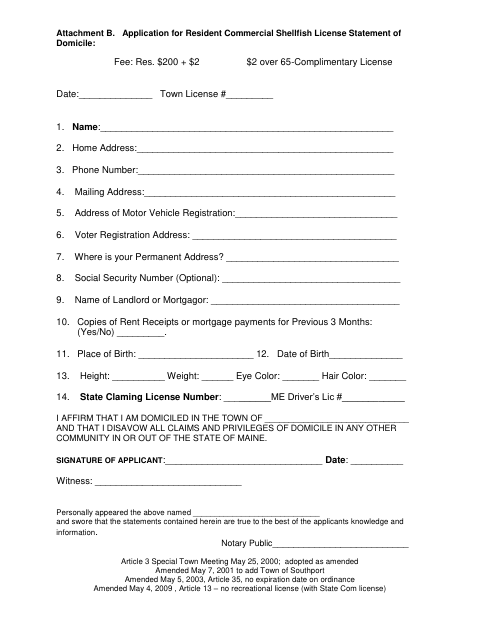
The form collects the applicant’s contact, residence, vehicle registration, voter registration, and other personal information, and asks whether the applicant can provide rent receipts or mortgage payment records for the previous three months. Applicants affirm that they are domiciled in the named town and disavow domicile claims in other communities; the form includes a notary block for that sworn statement.
Who needs it
Anyone applying for the resident commercial shellfish license described on the form should complete it and affirm the stated domicile information.
Why it needs a notary
The form has a jurat stating the applicant swore the statements were true; the applicant signs and swears before the notary.
How to get this notarized
- 1
Download The Application
Get the Commercial Resident Shellfish License application from the Town of Boothbay.
- 2
Fill In The Form
Complete the requested information and domicile statement. The form also asks about rent receipts or mortgage payment records for the previous three months.
- 3
Book An Online Notary
Schedule a session with a commissioned online notary for the sworn statement.
- 4
Sign On Video
Sign and swear to the statement during the online notary session.
- 5
Submit To The Town
Return the completed, notarized application to the Town of Boothbay and confirm its submission instructions.
Preview the form
The blank PDF straight from Boothbay. Look it over, then upload your filled copy to start the notary session.

You’ll need ID and a webcam.
A licensed online notary will join you on video, verify your government-issued ID, witness your signature, and apply their seal. You’ll receive the notarized PDF by email when the session ends.
Frequently asked questions
- How do I complete the sworn statement?
- Fill in the application, then sign and swear that its statements are true before a notary. The form includes a Notary Public block for this step.
- Do I need to sign in front of a notary?
- Yes. The form says the applicant swore the statements were true and provides a Notary Public signature block.
- Can I use a commissioned online notary?
- Maine law, 4 M.R.S. §1915, authorizes remote notarial acts for remotely located individuals. Use a commissioned online notary and confirm the town will accept the completed application.
- Where should I ask if I am unsure where to submit it?
- Contact the Town of Boothbay about this license application; confirm with the town, city, or county registry of deeds if unsure.