
Rumford, ME · Oxford County
Authorization to Release a Vital Record
This form lets a person eligible for a birth, death, or marriage record authorize someone else to obtain it, identifying the record and the person authorized to receive it.
- licensed online notary
- ~15 min average
- Notarized PDF emailed
What you’ll need
- Government-issued photo ID
- Webcam-enabled device (laptop or phone)
- This form, ready to upload as a PDF
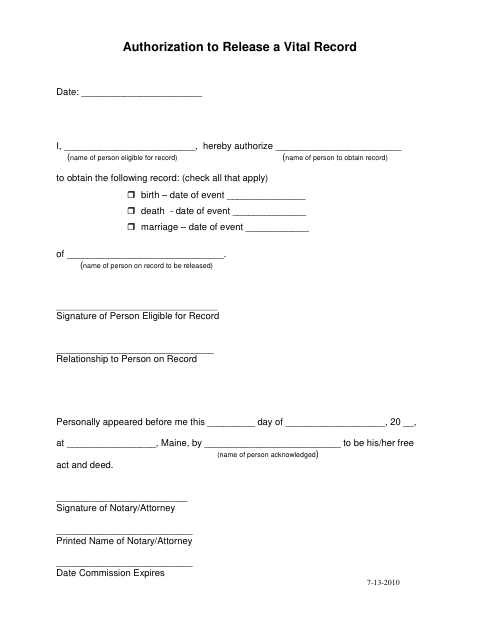
What this form is
The authorization identifies the person eligible for the record, the person authorized to obtain it, and whether the request concerns a birth, death, or marriage record. It also asks for the event date and the name of the person on the record. The form includes a signature line for the eligible person and a notary or attorney acknowledgment; check with the Town of Rumford about its submission process.
Who needs it
A person eligible for a birth, death, or marriage record uses this form to authorize another person to obtain the specified record.
Why it needs a notary
The form carries a personal-appearance acknowledgment stating the signer appeared before the notary or attorney and acknowledged the signature as their free act and deed.
How to get this notarized
- 1
Download the Form
Get the Authorization to Release a Vital Record form from the Town of Rumford.
- 2
Fill In the Details
Enter the eligible person, authorized recipient, record type, event date, and name on the record.
- 3
Book an Online Notary
Arrange a session with a commissioned online notary and have identification ready.
- 4
Sign on Video
Appear by video and acknowledge your signature before the notary.
- 5
Submit to the City
Follow the Town of Rumford's instructions for submitting the completed authorization.
Preview the form
The blank PDF straight from Rumford. Look it over, then upload your filled copy to start the notary session.

You’ll need ID and a webcam.
A licensed online notary will join you on video, verify your government-issued ID, witness your signature, and apply their seal. You’ll receive the notarized PDF by email when the session ends.
Frequently asked questions
- How do I complete this vital record release authorization?
- Identify the eligible person, the person authorized to obtain the record, the record type, event date, and person named on the record. The eligible person signs before a notary or attorney.
- Do I need to sign this form in front of a notary?
- The form includes a personal-appearance acknowledgment for the person authorizing release. The signer appears before the notary or attorney and acknowledges the signature as their free act and deed.
- Can I use a commissioned online notary for this form?
- Maine law, 4 M.R.S. §1915, authorizes remote notarization by Maine notaries, subject to specific exceptions. Confirm that the receiving office accepts the remotely notarized form before signing.
- Where do I submit the completed authorization?
- The form does not state where to submit it. Ask the Town of Rumford where to send the authorization and how to request the record; confirm with the town, city, or county registry of deeds if unsure.