
Bradley, ME · Penobscot County
Poverty Tax Abatement Application
Bradley residents use this application to request a property tax abatement based on household income, assets, liabilities, and other financial information for a specified tax year.
- licensed online notary
- ~15 min average
- Notarized PDF emailed
What you’ll need
- Government-issued photo ID
- Webcam-enabled device (laptop or phone)
- This form, ready to upload as a PDF
What this form is
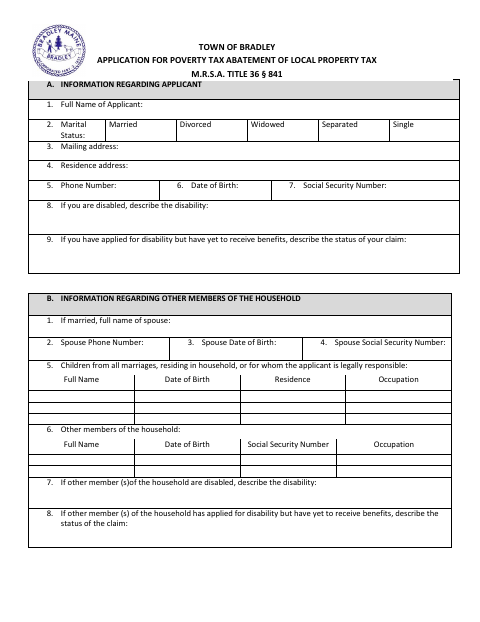
The application asks about the applicant’s household, property, employment, income, assets, and liabilities, and requests a reason for seeking an abatement. It is submitted to Bradley’s municipal officers for consideration of a property tax abatement for a specified year; the form says a separate application is needed for each year. It also requests household tax returns and W-2 forms and allows supporting information to be attached.
Who needs it
A Bradley property taxpayer seeking an abatement for a particular year should complete the application and provide the requested household financial details and supporting documents.
Why it needs a notary
The form includes a subscribed-and-sworn jurat; the applicant and any signing spouse or household members must sign before the notary.
How to get this notarized
- 1
Download the Form
Get Bradley’s poverty tax abatement application and review its instructions and requested supporting documents.
- 2
Fill Out the Application
Complete the household, property, income, asset, and liability sections for the tax year requested.
- 3
Book an Online Notary
Arrange a session with a commissioned online notary for the form’s subscribed-and-sworn jurat.
- 4
Sign on Video
Sign before the notary during the online video session; any other household members signing should also appear as instructed.
- 5
Submit to the Town
Provide the notarized application and required tax returns, W-2 forms, and any supporting documents to the Town of Bradley.
Preview the form
The blank PDF straight from Bradley. Look it over, then upload your filled copy to start the notary session.

You’ll need ID and a webcam.
A licensed online notary will join you on video, verify your government-issued ID, witness your signature, and apply their seal. You’ll receive the notarized PDF by email when the session ends.
Frequently asked questions
- How do I get the poverty tax abatement application notarized?
- Complete the application, then book with a commissioned online notary. Sign during the video session when instructed, and submit the notarized form and requested supporting documents to the Town of Bradley.
- Do I need to include financial documents with my application?
- The form says photocopies of all household members’ federal and state income tax returns and W-2 forms are necessary. It also says asset and liability statements would be helpful and permits additional information.
- Can I sign this application with an online notary?
- Maine law, 4 M.R.S. ch. 39, §1915, authorizes a notarial act for a remotely located individual, effective July 1, 2023. Confirm that the Town of Bradley will accept your remotely notarized application before signing.
- Where should I submit the completed application?
- The form is addressed to the Municipal Officers of Bradley and refers to the Town Council or its designee. Confirm submission instructions with the Town of Bradley; confirm with the town, city, or county registry of deeds if unsure.