
Westminster, MD · Carroll County
Water and Sewer Allocation Application
This application requests water and sewer allocations and is filed with the City of Westminster by property owners seeking an allocation for a property or proposed use.
- licensed online notary
- ~15 min average
- Notarized PDF emailed
What you’ll need
- Government-issued photo ID
- Webcam-enabled device (laptop or phone)
- This form, ready to upload as a PDF
What this form is
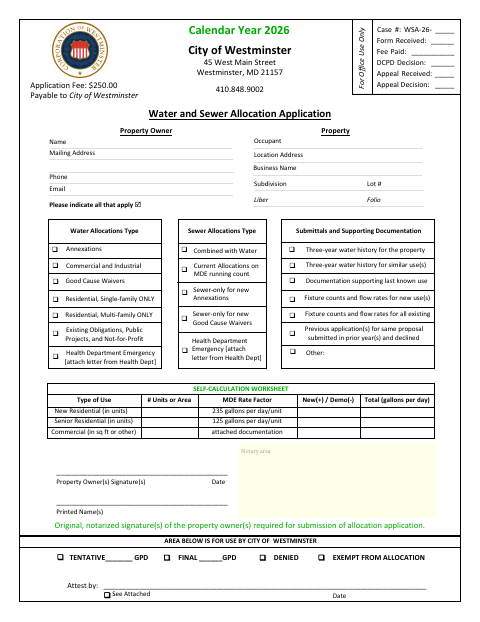
The application records the property and owner details, requested allocation types, and a self-calculation of daily water use. The City of Westminster requires original notarized property-owner signatures for submission; applicants may also need to provide supporting materials such as water-use history, fixture counts, or documentation of the last known use.
Who needs it
Property owners applying for water or sewer allocations in Westminster must complete this application and provide the required supporting documentation.
Why it needs a notary
The form provides a notary area and requires original notarized signatures from the property owner or owners; it does not specify whether the notarial certificate is a jurat or acknowledgment.
How to get this notarized
- 1
Download the Application
Get the Water and Sewer Allocation Application from the City of Westminster.
- 2
Complete the Form
Enter the property and owner information, indicate allocation types, calculate daily use, and gather applicable supporting documents.
- 3
Book an Online Notary
Arrange a remote video appointment with a commissioned online notary for the property-owner signatures.
- 4
Sign on Video
Sign the application as directed during the notary video session and obtain the notarized original.
- 5
Submit to the City
Submit the completed application, notarized original signatures, and applicable supporting documents to the City of Westminster.
Preview the form
The blank PDF straight from Westminster. Look it over, then upload your filled copy to start the notary session.

You’ll need ID and a webcam.
A licensed online notary will join you on video, verify your government-issued ID, witness your signature, and apply their seal. You’ll receive the notarized PDF by email when the session ends.
Frequently asked questions
- How do I get the property-owner signatures notarized?
- Complete the application, then meet with a commissioned online notary by video and sign as directed. The city requires original notarized property-owner signatures for submission.
- Do I need supporting documents with this application?
- The form lists possible supporting materials, including three-year water history, last-known-use documentation, and fixture counts and flow rates. Check which items apply to your proposed use.
- Can I use an online notary for this form?
- Maryland's remote-notarization framework is based on the Revised Uniform Law on Notarial Acts, codified in State Government Article, Title 18, Annotated Code of Maryland, in effect since 2020. Confirm the city accepts your notarized original.
- Where do I submit the application?
- The form is for the City of Westminster and lists its address as 45 West Main Street, Westminster, MD 21157. Confirm with the county, city, or town if unsure.