
Falmouth, MA · Barnstable County
Private Individual Mooring Transfer Request Form
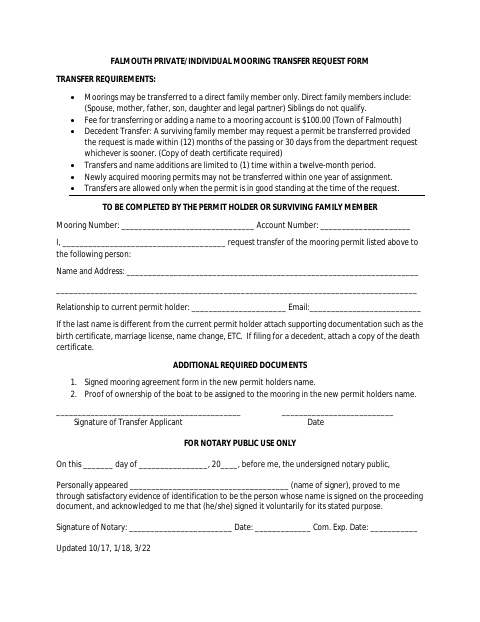
This form requests transfer of a private or individual mooring permit to an eligible direct family member and is filed by the current permit holder or a surviving family member.
- licensed online notary
- ~15 min average
- Notarized PDF emailed
What you’ll need
- Government-issued photo ID
- Webcam-enabled device (laptop or phone)
- This form, ready to upload as a PDF
What this form is
Use this Town of Falmouth form to request transfer of a private or individual mooring permit to an eligible direct family member. Transfers are subject to requirements including the permit being in good standing, limits on how often transfers may occur, and a $100 fee. The request must include a signed mooring agreement and proof of boat ownership in the new permit holder’s name; additional supporting documents may also be required.
Who needs it
A current permit holder or surviving family member requesting to transfer a Falmouth private or individual mooring permit to an eligible direct family member needs this form.
Why it needs a notary
The form includes an acknowledgment block; the transfer applicant or surviving family member whose signature appears on the request signs before the notary.
How to get this notarized
- 1
Download the Form
Get the Mooring Transfer Request Form from the Town of Falmouth.
- 2
Complete the Request
Enter the mooring and account details, transfer recipient information, and relationship to the current permit holder.
- 3
Gather Required Documents
Prepare the signed mooring agreement and proof of boat ownership in the new permit holder’s name, plus any applicable supporting documents.
- 4
Book an Online Notary
Arrange an online notarization for the transfer applicant’s acknowledgment.
- 5
Sign on Video
Sign the request in the commissioned online notary’s presence during the video session.
- 6
Submit to the Town
Send the notarized form and required attachments to the Town of Falmouth.
Preview the form
The blank PDF straight from Falmouth. Look it over, then upload your filled copy to start the notary session.

You’ll need ID and a webcam.
A licensed online notary will join you on video, verify your government-issued ID, witness your signature, and apply their seal. You’ll receive the notarized PDF by email when the session ends.
Frequently asked questions
- How do I submit a Falmouth mooring transfer request?
- Complete the form, sign it before a notary, and include the required signed mooring agreement and proof of boat ownership in the new permit holder’s name. Submit the materials to the Town of Falmouth.
- Do I need to attach supporting documents?
- The form requires a signed mooring agreement and proof of boat ownership in the new permit holder’s name. It also requests supporting documentation for a different last name and a death certificate for a decedent transfer.
- Can I have the transfer request notarized online?
- Massachusetts permanently authorized remote online notarization for its own notaries effective January 1, 2024. A commissioned online notary can notarize the applicant’s acknowledgment; confirm with the city or town clerk if unsure whether the town accepts the remotely notarized form.
- Who is eligible to receive a transferred mooring permit?
- The form allows transfers only to a direct family member, listing a spouse, mother, father, son, daughter, or legal partner. It states that siblings do not qualify.