
Sandwich, MA · Barnstable County
Business Certificate Application Instructions
These instructions explain how individuals and businesses operating in Sandwich under a name other than their complete legal name file a Business Certificate, also known as a DBA, with the Town Clerk.
- licensed online notary
- ~15 min average
- Notarized PDF emailed
What you’ll need
- Government-issued photo ID
- Webcam-enabled device (laptop or phone)
- This form, ready to upload as a PDF
What this form is
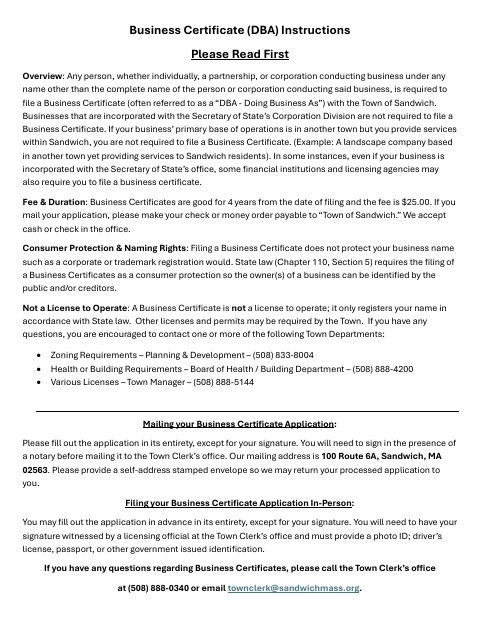
The instructions explain who must file a Business Certificate, the $25 fee, and the certificate’s four-year duration. They say to complete the application but leave the signature blank until signing before a notary for a mailed filing, or before a licensing official at the Town Clerk’s office for an in-person filing. A mailed application goes to the Town Clerk’s office and should include a self-addressed stamped envelope for its return.
Who needs it
Individuals, partnerships, or corporations doing business in Sandwich under a name other than their complete name may need to file, subject to the exclusions in the instructions.
Why it needs a notary
The instructions show no jurat or acknowledgment block; for a mailed application, the applicant signs the application in a notary’s presence, while in-person signatures are witnessed by a licensing official.
How to get this notarized
- 1
Download the Instructions
Download and read the Business Certificate instructions before preparing your application.
- 2
Complete the Application
Fill in the application, but leave the signature blank until you are with the required witness.
- 3
Book an Online Notary
For a mailed filing, book a commissioned online notary and check the Town Clerk’s acceptance process.
- 4
Sign on Video
Sign the application in the notary’s presence during your online video session.
- 5
Submit to the Town
Mail the signed application and $25 fee to the Sandwich Town Clerk’s office with a self-addressed stamped envelope.
Preview the form
The blank PDF straight from Sandwich. Look it over, then upload your filled copy to start the notary session.

You’ll need ID and a webcam.
A licensed online notary will join you on video, verify your government-issued ID, witness your signature, and apply their seal. You’ll receive the notarized PDF by email when the session ends.
Frequently asked questions
- How do I file a Business Certificate by mail?
- Complete the application but leave the signature blank. Sign in the presence of a notary, then mail it with the $25 fee and a self-addressed stamped envelope to the Sandwich Town Clerk’s office.
- Do I need to notarize my signature for an in-person filing?
- No. The instructions say to leave the signature blank until you visit the Town Clerk’s office, where a licensing official witnesses your signature. Bring a government-issued photo ID.
- Can I sign online with a notary?
- Massachusetts permanently authorized remote online notarization for its own notaries effective January 1, 2024. You can sign with a commissioned online notary; confirm the Town Clerk’s acceptance process before mailing.
- How long does the Business Certificate last?
- The instructions state that a Business Certificate is valid for four years from the filing date and costs $25. It registers a business name but is not a license to operate.
- Who should I contact if I am unsure whether to file?
- The instructions direct questions about Business Certificates to the Sandwich Town Clerk’s office. Contact the city or town clerk if unsure about filing requirements or submission details.