
Taunton, MA · Bristol County
Application and Waiver of Liability for Removal of Remains
This application and waiver requests permission to remove remains from a Taunton cemetery for re-interment, and is completed by an interested party or submitted on their behalf by a funeral director.
- licensed online notary
- ~15 min average
- Notarized PDF emailed
What you’ll need
- Government-issued photo ID
- Webcam-enabled device (laptop or phone)
- This form, ready to upload as a PDF
What this form is
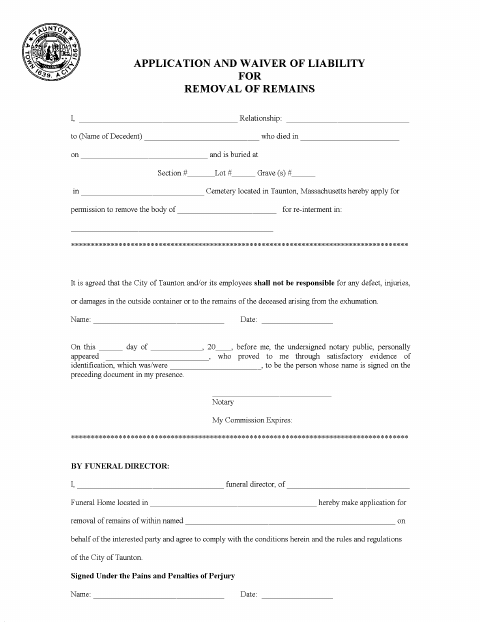
The form applies for permission to remove a deceased person’s remains from a cemetery in Taunton for re-interment. It identifies the applicant’s relationship to the decedent and the cemetery burial location, and includes a waiver concerning damage or injury arising from exhumation. A funeral director may also apply on behalf of the interested party and agrees to comply with the form’s conditions and City of Taunton rules and regulations.
Who needs it
An interested party seeking removal and re-interment of remains from a Taunton cemetery, or a funeral director applying on that party’s behalf, uses this form.
Why it needs a notary
The applicant signs before the notary, who completes the personal-appearance certificate identifying the signer; the form has no separate notary block for the funeral director.
How to get this notarized
- 1
Download the Form
Get the disinterment application and waiver from the City of Taunton.
- 2
Fill In the Application
Enter the decedent, applicant, cemetery, and re-interment information requested on the form.
- 3
Book an Online Notary
Schedule a remote session with a commissioned online notary.
- 4
Sign on Video
Sign the application during the video session so the notary can complete the certificate.
- 5
Submit to the City
Submit the completed form to the City of Taunton according to its instructions.
Preview the form
The blank PDF straight from Taunton. Look it over, then upload your filled copy to start the notary session.

You’ll need ID and a webcam.
A licensed online notary will join you on video, verify your government-issued ID, witness your signature, and apply their seal. You’ll receive the notarized PDF by email when the session ends.
Frequently asked questions
- How do I get the disinterment application notarized?
- Complete the application, then book a commissioned online notary. Sign during the video session so the notary can complete the form’s personal-appearance certificate.
- Do I need to sign in front of a notary?
- Yes. The form includes a notary certificate stating that the signer personally appeared and signed the preceding document in the notary’s presence.
- Can I use a commissioned online notary for this form?
- Massachusetts permanently authorized remote online notarization for its own notaries effective January 1, 2024, under G.L. c. 222, §§ 27–29. Check that the city will accept the remotely notarized form.
- Who can submit the application?
- An interested party may apply for removal and re-interment. The form also allows a funeral director to apply on behalf of the interested party and agree to follow the stated conditions and city rules.
- Where should I check submission requirements?
- The form requests permission from the City of Taunton. Confirm submission instructions and acceptance of a remotely notarized form with the city or town clerk if unsure.