
Swampscott, MA · Essex County
Affidavit of Mailing
This affidavit records when and how an affiant mailed documents, identifies the recipients and addresses, and provides sworn evidence for the person submitting the mailing record.
- licensed online notary
- ~15 min average
- Notarized PDF emailed
What you’ll need
- Government-issued photo ID
- Webcam-enabled device (laptop or phone)
- This form, ready to upload as a PDF
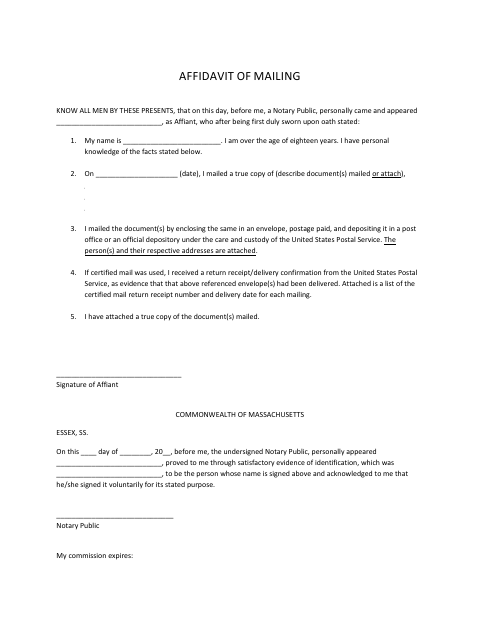
What this form is
The affiant states the mailing date, describes the documents sent, and attests that postage-paid envelopes were deposited with the United States Postal Service. The form also calls for the recipients’ addresses and, when certified mail was used, return receipt numbers and delivery dates; a true copy of the documents mailed is attached. Use it when sworn documentation of a mailing is needed.
Who needs it
A person who mailed documents and needs to provide a sworn account of the mailing, with recipient details and copies or delivery evidence as applicable, completes this form.
How to get this notarized
- 1
Download the Form
Download the Affidavit of Mailing from the Swampscott document page.
- 2
Fill In the Mailing Details
Enter the date and describe the documents mailed; prepare the recipient details and supporting attachments requested by the form.
- 3
Book an Online Notary
Arrange an appointment with a commissioned online notary and have identification ready.
- 4
- 5
Submit the Completed Form
Attach the supporting materials and submit the completed affidavit to the city.
Preview the form
The blank PDF straight from Swampscott. Look it over, then upload your filled copy to start the notary session.

You’ll need ID and a webcam.
A licensed online notary will join you on video, verify your government-issued ID, witness your signature, and apply their seal. You’ll receive the notarized PDF by email when the session ends.
Frequently asked questions
- How do I complete the Affidavit of Mailing?
- Fill in the mailing date and document description, attach the recipient addresses and a true copy of the mailed documents, and include certified-mail receipt numbers and delivery dates if applicable.
- Do I need to sign the affidavit in front of a notary?
- Yes. The form says the affiant appears before a notary and is sworn, and its notary block records the affiant’s appearance and acknowledgment. Wait to sign until directed during the appointment.
- Can I use an online notary for this form?
- Massachusetts permanently authorized remote online notarization for its own notaries effective January 1, 2024. A commissioned online notary may notarize remotely; confirm with the city or town clerk if unsure whether the completed form will be accepted.
- What supporting documents does the form call for?
- Attach the recipient names and addresses and a true copy of the documents mailed. If you used certified mail, also attach a list of the return receipt numbers and delivery dates.