
Longmeadow, MA · Hampden County
Doing Business As Certificate and Workers’ Compensation Affidavit
This combined form registers a business name and collects workers’ compensation information for businesses filing a Doing Business As certificate with the Longmeadow Town Clerk’s Office.
- licensed online notary
- ~15 min average
- Notarized PDF emailed
What you’ll need
- Government-issued photo ID
- Webcam-enabled device (laptop or phone)
- This form, ready to upload as a PDF
What this form is
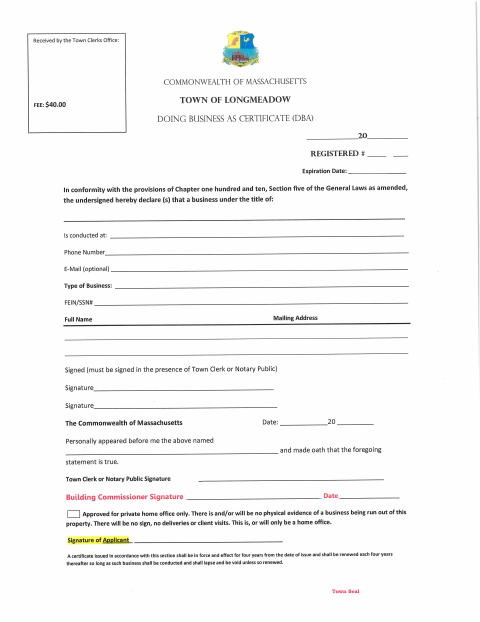
The form combines a Massachusetts Doing Business As certificate with a Workers’ Compensation Insurance Affidavit for general businesses. The certificate identifies the business title, location, contact details, and owner, while the affidavit asks about employees, business type, and insurance coverage. The form directs applicants to sign the certificate in the presence of the Town Clerk or a notary public; the Town Clerk’s Office receives the certificate, and a building commissioner signature section is included for private home office approval.
Who needs it
Business owners filing a Doing Business As certificate with the Longmeadow Town Clerk’s Office should complete the form and provide the requested workers’ compensation information.
Why it needs a notary
The certificate includes a jurat stating the signer personally appeared and swore the statement was true; the business owner signs before a notary public or Town Clerk.
How to get this notarized
- 1
Download the Form
Get the Doing Business As certificate and Workers’ Compensation Insurance Affidavit from the Longmeadow Town website.
- 2
Fill In the Form
Complete the business, owner, and workers’ compensation sections that apply to your business.
- 3
Book an Online Notary
Schedule a remote session with a commissioned online notary for the certificate’s jurat.
- 4
Sign on Video
Join the video session and sign the certificate when the notary instructs you to do so.
- 5
Submit to the Town
Submit the completed form to the Longmeadow Town Clerk’s Office and follow its filing instructions.
Preview the form
The blank PDF straight from Longmeadow. Look it over, then upload your filled copy to start the notary session.

You’ll need ID and a webcam.
A licensed online notary will join you on video, verify your government-issued ID, witness your signature, and apply their seal. You’ll receive the notarized PDF by email when the session ends.
Frequently asked questions
- How do I get the DBA certificate notarized?
- Complete the certificate, then meet with a commissioned online notary by video and sign when instructed. The form requires the signer to swear that the statement is true.
- Do I need to notarize the workers’ compensation affidavit too?
- The form’s notary wording appears in the Doing Business As certificate section. The workers’ compensation affidavit has its own certification and signature line; confirm with the city or town clerk if unsure.
- Can I use a commissioned online notary for this form?
- Massachusetts permanently authorized remote online notarization for its own notaries effective January 1, 2024. The certificate calls for a notary public or Town Clerk, so check with the Town Clerk’s Office about its filing requirements.
- What information does the form request?
- The certificate asks for the business title, location, contact details, type of business, and owner information. The affidavit asks about employer status, business type, and workers’ compensation coverage.
Doing Business As Certificate and Workers’ Compensation Affidavit in other Hampden County cities
Each city publishes its own version of this form. Pick the city where you’re filing.