
Billerica, MA · Middlesex County
Affidavit for Estimated Cost of Construction
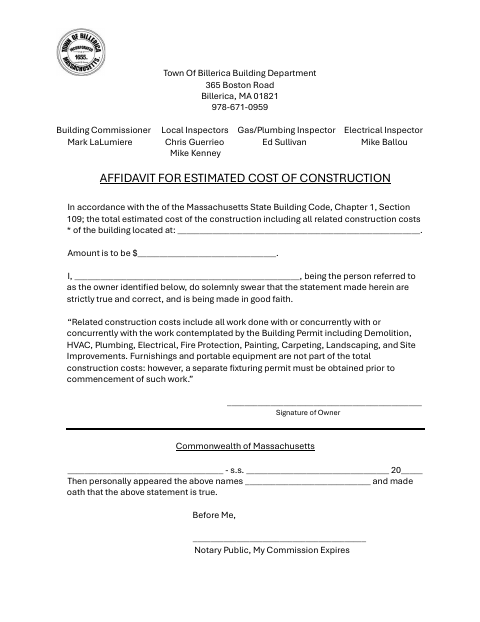
This affidavit states the estimated total cost of construction, including related work, and is completed by the property owner for the Billerica Building Department.
- licensed online notary
- ~15 min average
- Notarized PDF emailed
What you’ll need
- Government-issued photo ID
- Webcam-enabled device (laptop or phone)
- This form, ready to upload as a PDF
What this form is
Billerica’s Building Department form records the estimated cost of construction at a stated building location, including related work such as demolition, HVAC, plumbing, electrical, and site improvements. The owner swears that the statement is true and correct and made in good faith. The form references Chapter 1, Section 109 of the Massachusetts State Building Code and includes office-use fields for final cost, the original estimate, cost difference, and any additional fee.
Who needs it
A property owner completing this affidavit for the Billerica Building Department must provide the construction location and estimated cost, then swear that the statement is true and correct.
How to get this notarized
- 1
Download the Affidavit
Get the Cost Affidavit for Estimate of Construction from the Billerica Building Department.
- 2
Fill In the Owner and Cost Details
Enter the building location, estimated construction cost, and owner information. Leave the signature for the notary appointment.
- 3
Book an Online Notary
Schedule a remote appointment with a commissioned online notary.
- 4
Sign and Swear on Video
Appear by video, sign the affidavit, and swear that its statement is true before the notary.
- 5
Submit It to the Building Department
Send the notarized affidavit to the Billerica Building Department and confirm any submission instructions with the department.
Preview the form
The blank PDF straight from Billerica. Look it over, then upload your filled copy to start the notary session.

You’ll need ID and a webcam.
A licensed online notary will join you on video, verify your government-issued ID, witness your signature, and apply their seal. You’ll receive the notarized PDF by email when the session ends.
Frequently asked questions
- How do I notarize the construction cost affidavit online?
- Complete the affidavit, then meet with a commissioned online notary by video. Sign and swear to the statement during the notarization, and submit the completed form to the Billerica Building Department.
- Do I need to sign the affidavit in front of a notary?
- Yes. The form has an oath and notary block stating that the owner personally appeared and swore the statement was true. Sign before the notary administers the oath.
- Can a commissioned online notary notarize this form?
- Massachusetts permanently authorized remote online notarization for its own notaries effective January 1, 2024. A commissioned online notary can notarize remotely; confirm the Building Department’s submission requirements if unsure.
- Who should I contact if I am unsure how to complete or submit it?
- Contact the Billerica Building Department about the form and submission. Confirm with the city or town clerk if unsure.