
Framingham, MA · Middlesex County
Criminal Offender Record Information Personal Request Form
This form lets an individual request their own Criminal Offender Record Information (CORI) from the Massachusetts Department of Criminal Justice Information Services (DCJIS).
- licensed online notary
- ~15 min average
- Notarized PDF emailed
What you’ll need
- Government-issued photo ID
- Webcam-enabled device (laptop or phone)
- This form, ready to upload as a PDF
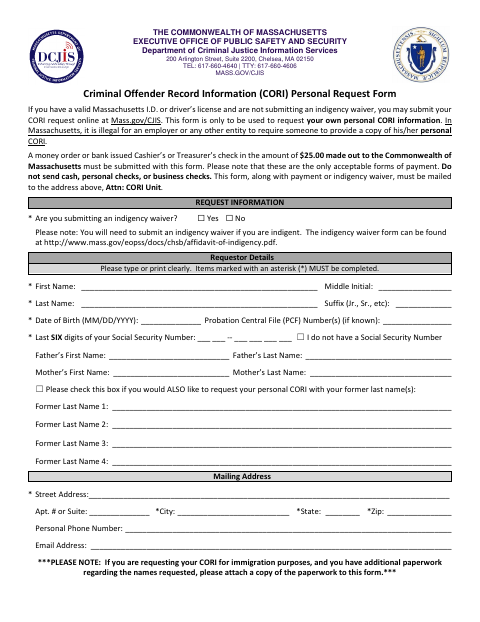
What this form is
Use this form to request your own personal CORI information from DCJIS. Complete the requestor details and authorization, then mail the form with the required payment or indigency waiver to the CORI Unit; the form says a notary must authenticate the signature unless you are currently incarcerated.
Who needs it
An individual seeking their own personal CORI information by paper request may use this form, unless they are currently incarcerated and must complete the correctional facility section.
Why it needs a notary
The form contains an acknowledgment block: the requestor signs the authorization, then personally appears before a notary, who completes every field, signs, and applies a seal.
How to get this notarized
- 1
Download the Form
Get the Personal CORI Request Form and review its instructions, payment rules, and notary section.
- 2
Complete the Request
Fill in required identifying and mailing details, choose whether to include former last names, and prepare the required payment or indigency waiver.
- 3
Book an Online Notary
Schedule a commissioned online notary to authenticate your signature; do not sign the authorization beforehand.
- 4
Sign on Video
Appear before the notary, provide satisfactory evidence of identification, and sign the authorization as directed.
- 5
Mail to DCJIS
Include the completed form and payment or indigency waiver, then mail it to the DCJIS address shown, Attn: CORI Unit.
Preview the form
The blank PDF straight from Framingham. Look it over, then upload your filled copy to start the notary session.

You’ll need ID and a webcam.
A licensed online notary will join you on video, verify your government-issued ID, witness your signature, and apply their seal. You’ll receive the notarized PDF by email when the session ends.
Frequently asked questions
- How do I complete the notary section on this CORI request?
- Sign the authorization in front of the notary. The notary completes all fields in the authentication section, including identification evidence, signature, date, and seal.
- Do I need to have this form notarized?
- The form includes a notary authentication section, but says it need not be completed if you are currently incarcerated. In that case, proceed to the correctional facility section.
- Can I use an online notary for this form?
- Massachusetts permanently authorized remote online notarization for its own notaries effective January 1, 2024. A commissioned online notary can notarize the acknowledgment; confirm with DCJIS that it will accept your completed form.
- Where do I send my completed CORI request?
- The form instructs you to mail it with payment or an indigency waiver to the DCJIS address shown on the form, Attn: CORI Unit. For questions about a separate municipal form, confirm with the city or town clerk if unsure.