
Braintree, MA · Norfolk County
Public Amusement License Application
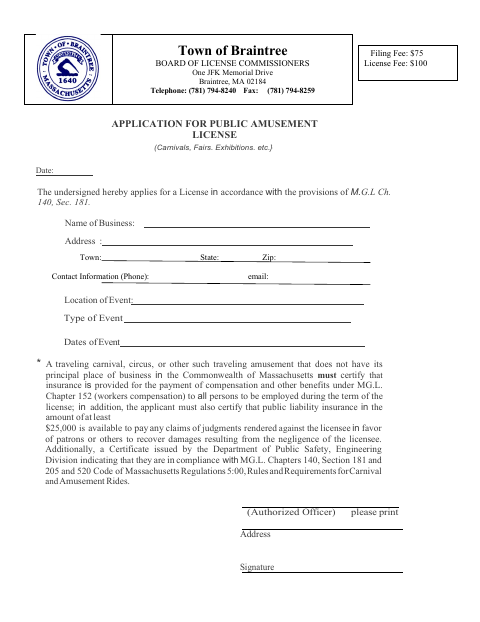
This three-page packet applies for a Town of Braintree public amusement license and includes a CORI authorization for each individual with a financial or beneficial interest and the proposed manager of record.
- licensed online notary
- ~15 min average
- Notarized PDF emailed
What you’ll need
- Government-issued photo ID
- Webcam-enabled device (laptop or phone)
- This form, ready to upload as a PDF
What this form is
The packet is for applicants seeking a Braintree license for a carnival, fair, exhibition, or other public amusement. It requests business, event, and contact details, and includes a CORI acknowledgement and authorization form for specified individuals. The application describes insurance and safety documentation certifications for certain traveling amusements; the CORI Authorization Form must be notarized with a stamp or raised seal.
Who needs it
Applicants seeking a Braintree public amusement license should complete the application and provide a separate CORI Authorization Form for each required individual.
Why it needs a notary
The CORI Authorization Form requires notarization with a stamp or raised seal; the CORI subject signs the authorization before the notary.
How to get this notarized
- 1
Download the Application
Download the Public Amusement License Application packet from the Town of Braintree.
- 2
Complete the Application
Fill in the business, event, and contact details, and prepare a CORI Authorization Form for each required individual.
- 3
Book an Online Notary
Arrange an online notary appointment for the CORI subject who must sign the authorization.
- 4
Sign on Video
Sign the CORI Authorization Form during the online session and follow the notary’s instructions.
- 5
Submit to the Town
Submit the completed application packet and notarized CORI authorization to the Town as directed.
Preview the form
The blank PDF straight from Braintree. Look it over, then upload your filled copy to start the notary session.

You’ll need ID and a webcam.
A licensed online notary will join you on video, verify your government-issued ID, witness your signature, and apply their seal. You’ll receive the notarized PDF by email when the session ends.
Frequently asked questions
- How do I get the CORI Authorization Form notarized?
- Complete the form, then sign it before a commissioned online notary. The form says it must be notarized with a stamp or raised seal; confirm the Town’s acceptance of remote notarization and its seal requirements.
- Do I need a separate CORI Authorization Form?
- The form instructs applicants to complete one for each individual with a financial or beneficial interest in the applying entity and for the proposed manager of record.
- Can I sign the CORI form before my online notary appointment?
- No. The CORI subject should sign the authorization in the notary’s presence during the online session. Have the completed form and required identification ready.
- Who should I contact about submitting the application?
- The packet lists the Town of Braintree Board of License Commissioners. For questions about where to submit it or what the Town will accept, confirm with the city or town clerk if unsure.