
Franklin, MA · Norfolk County
Application for Approval of a Limited Site Plan
Form P is the Town of Franklin application applicants submit to the Planning Board to seek approval of a Limited Site Plan under the town’s zoning by-laws.
- licensed online notary
- ~15 min average
- Notarized PDF emailed
What you’ll need
- Government-issued photo ID
- Webcam-enabled device (laptop or phone)
- This form, ready to upload as a PDF
What this form is
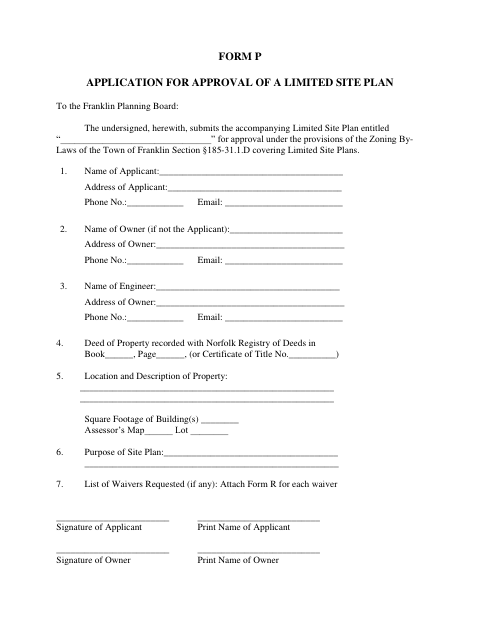
Form P asks an applicant to submit a Limited Site Plan to the Franklin Planning Board for approval under the town’s zoning by-laws. It records applicant, owner, engineer, property, deed, building, and plan-purpose details, and includes a certificate of ownership identifying parties of interest. The form is used when seeking approval for a Limited Site Plan; any requested waivers require a separate Form R for each waiver.
Who needs it
Applicants seeking Franklin Planning Board approval of a Limited Site Plan use this form to provide plan, property, ownership, and applicant information.
Why it needs a notary
The form includes a jurat: the applicant named in the certificate must appear before the notary, establish identity through satisfactory evidence, and sign in the notary’s presence.
How to get this notarized
- 1
Download Form P
Get the Limited Site Plan application from the Town of Franklin.
- 2
Fill In the Application
Provide the requested applicant, owner, engineer, property, deed, and plan information.
- 3
Book an Online Notary
Arrange a remote notarization for the applicant’s certificate of ownership.
- 4
Sign on Video
The applicant appears before the notary, verifies identity, and signs in the notary’s presence.
- 5
Submit to the Planning Board
Send the completed application to the Franklin Planning Board.
Preview the form
The blank PDF straight from Franklin. Look it over, then upload your filled copy to start the notary session.

You’ll need ID and a webcam.
A licensed online notary will join you on video, verify your government-issued ID, witness your signature, and apply their seal. You’ll receive the notarized PDF by email when the session ends.
Frequently asked questions
- How do I complete and submit Form P?
- Fill in the plan, applicant, owner, property, and other requested details. Have the applicant complete the notarized certificate, then submit the application to the Franklin Planning Board.
- Do I need a notary for this application?
- Yes. Form P includes a notary jurat requiring the applicant to appear before the notary, establish identity, and sign the preceding document in the notary’s presence.
- Can I use a commissioned online notary?
- Massachusetts permanently authorized remote online notarization for its own notaries effective January 1, 2024. Ask the Franklin Planning Board whether it accepts a remotely notarized application.
- Where do I file the completed form?
- The application is addressed to the Franklin Planning Board. For local filing questions, confirm with the city or town clerk if unsure.