
East Brookfield, MA · Worcester County
Request for Personal Firearms License and Sale/Rental/Lease Data
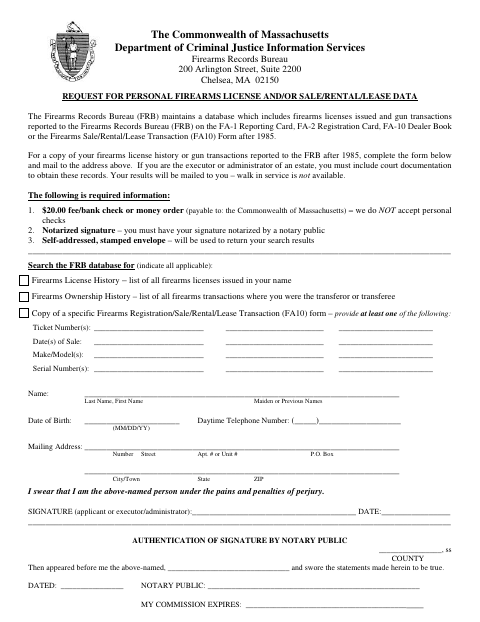
This request lets an individual or estate executor or administrator seek firearms license history or reported transaction records from the Massachusetts Firearms Records Bureau by mail.
- licensed online notary
- ~15 min average
- Notarized PDF emailed
What you’ll need
- Government-issued photo ID
- Webcam-enabled device (laptop or phone)
- This form, ready to upload as a PDF
What this form is
The form asks the Firearms Records Bureau to search for firearms license history, ownership history, or a specific reported transaction. The applicant must provide identifying details, a notarized signature, a $20 bank check or money order, and a self-addressed stamped envelope; executors or administrators must also include court documentation. Mail the completed request to the Bureau’s address on the form; walk-in service is not available.
Who needs it
An individual seeking their firearms license or transaction records, or an estate executor or administrator requesting records with court documentation, may use this form.
Why it needs a notary
The form has a jurat-style block stating the applicant appeared and swore the statements were true; the applicant or executor/administrator signs before the notary.
How to get this notarized
- 1
Download the Request Form
Download the form and review its instructions for requesting firearms license or transaction records.
- 2
Fill In Your Information
Provide your identifying details and select the records you want the Firearms Records Bureau to search for.
- 3
Book an Online Notary
Arrange a session with a commissioned online notary for the form’s notarized signature requirement.
- 4
Sign on Video
Sign before the notary during your online session and complete the form’s sworn statement.
- 5
Mail Your Request to FRB
Include the required payment and self-addressed stamped envelope, then mail the request to the Bureau’s address on the form.
Preview the form
The blank PDF straight from East Brookfield. Look it over, then upload your filled copy to start the notary session.

You’ll need ID and a webcam.
A licensed online notary will join you on video, verify your government-issued ID, witness your signature, and apply their seal. You’ll receive the notarized PDF by email when the session ends.
Frequently asked questions
- How do I request firearms license or transaction records?
- Complete the form, include the required $20 bank check or money order and self-addressed stamped envelope, have your signature notarized, and mail the request to the Firearms Records Bureau.
- Do I need a notary for this request?
- Yes. The form lists a notarized signature as required and includes a section where the notary records your appearance and sworn statement.
- Can I sign this form with an online notary?
- Massachusetts permanently authorized remote online notarization for its own notaries effective January 1, 2024. Check with the Firearms Records Bureau about its process for receiving a remotely notarized mailed form.
- Where do I submit the completed form?
- Mail it to the Firearms Records Bureau at the address printed on the form; walk-in service is not available. For questions about a local municipal requirement, confirm with the city or town clerk if unsure.