
Gardner, MA · Worcester County
Second-Hand Article and Junk Dealer License Application
This 13-page application is for people or businesses seeking a Gardner license to collect or deal in junk, old metals, or second-hand articles, including applicants renewing or changing location.
- licensed online notary
- ~15 min average
- Notarized PDF emailed
What you’ll need
- Government-issued photo ID
- Webcam-enabled device (laptop or phone)
- This form, ready to upload as a PDF
What this form is
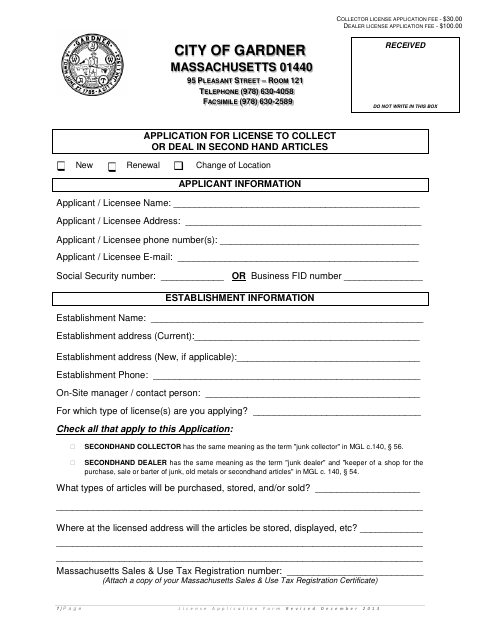
Use this application to request a new or renewed license, or report a change of location, for collecting or dealing in second-hand articles. It asks for applicant and establishment details, the articles handled, and tax certifications; it also includes a good-standing certification and a criminal-history authorization. The application says the required fee and supporting documents must be submitted to the City Clerk, and filing alone does not authorize business activity before a license is granted.
Who needs it
Individuals or businesses applying for, renewing, or changing the location of a Gardner license to collect or deal in junk, old metals, or second-hand articles need this form.
Why it needs a notary
The form includes a notarial acknowledgment following the federal tax certification affidavit; the applicant’s authorized person signs the certification before the notary.
How to get this notarized
- 1
Download the Application
Get the Second-Hand Article and Junk Dealer License Application from the City of Gardner.
- 2
Complete the Form
Fill in the applicant, establishment, license type, and certification details, and gather the supporting documents listed on the form.
- 3
Book an Online Notary
Schedule a remote online notarization for the certification signature that requires notarization.
- 4
Sign on Video
Meet with a commissioned online notary by video and sign the certification when instructed.
- 5
Submit to the City
Mail the completed application, required affidavit, and fee check to the Gardner City Clerk as directed on the form.
Preview the form
The blank PDF straight from Gardner. Look it over, then upload your filled copy to start the notary session.

You’ll need ID and a webcam.
A licensed online notary will join you on video, verify your government-issued ID, witness your signature, and apply their seal. You’ll receive the notarized PDF by email when the session ends.
Frequently asked questions
- How do I get the tax certification affidavit notarized?
- Complete the certification, then meet with a commissioned online notary by video and sign when instructed. The form provides a notarial acknowledgment for the authorized person’s signature.
- Do I need to notarize the entire license application?
- The form specifically instructs applicants to have certification signatures notarized and includes an acknowledgment after the federal tax certification. Check with the city or town clerk if unsure which signatures must be notarized.
- Can I use a commissioned online notary for this form?
- Massachusetts permanently authorized remote online notarization for its own notaries effective January 1, 2024. An acknowledgment taken outside the Commonwealth by a notary authorized where it was taken is recognized under G.L. c. 183, §30(b).
- Where do I submit the completed application?
- The form directs applicants to mail the completed application, Workers’ Compensation Affidavit, and check to the City Clerk at 95 Pleasant Street, Room 121, Gardner, MA 01440-2690.