
Oxford, MA · Worcester County
Class III License Application
This packet is for applicants seeking an Oxford Class III license to buy, sell, exchange, or assemble second-hand motor vehicles or parts, and is submitted to the Board of Selectmen.
- licensed online notary
- ~15 min average
- Notarized PDF emailed
What you’ll need
- Government-issued photo ID
- Webcam-enabled device (laptop or phone)
- This form, ready to upload as a PDF
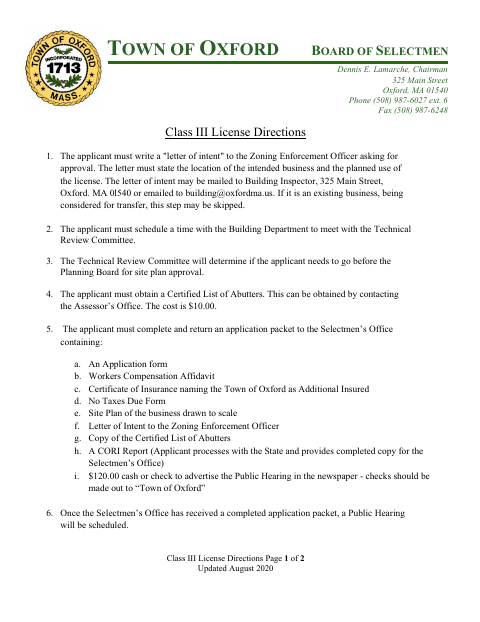
What this form is
The packet combines the license application with supporting materials, including a workers’ compensation affidavit, tax certification, personal CORI request form, site plan requirements, and license directions. Applicants submit a completed packet to the Selectmen’s Office; the directions say a public hearing will be scheduled after receipt, and applicants must send hearing notices to abutters by certified mail. A signed CORI authorization requires notary authentication.
Who needs it
A person or business applying to the Oxford Board of Selectmen for a Class III license to buy, sell, exchange, or assemble second-hand motor vehicles or parts needs this packet.
Why it needs a notary
The CORI Personal Request Authorization carries an acknowledgment block; the CORI requestor signs the authorization and appears before the notary for signature authentication.
How to get this notarized
- 1
Download the Packet
Download Oxford’s Class III license application packet and review its directions and supporting-form requirements.
- 2
Complete the Forms
Fill in the application and required supporting materials, including the CORI request and authorization, tax certification, workers’ compensation affidavit, and site plan.
- 3
Book an Online Notary
Schedule an appointment with a commissioned online notary to authenticate the signature on the CORI Personal Request Authorization.
- 4
Sign on Video
Appear by video, verify your identity, and sign the CORI authorization as directed by the notary.
- 5
Submit to the Town
Return the completed packet to the Selectmen’s Office and follow the directions for the public hearing and notice to abutters.
Preview the form
The blank PDF straight from Oxford. Look it over, then upload your filled copy to start the notary session.

You’ll need ID and a webcam.
A licensed online notary will join you on video, verify your government-issued ID, witness your signature, and apply their seal. You’ll receive the notarized PDF by email when the session ends.
Frequently asked questions
- How do I notarize the CORI authorization in this packet?
- Complete the CORI request and authorization, then meet with a commissioned online notary by video. Sign the authorization as directed and follow the notary’s instructions for completing the acknowledgment.
- Do I need to notarize the entire Class III application?
- The packet’s notary block is for authentication of the signature on the CORI Personal Request Authorization. The form text does not specify notarization for the entire license application.
- Can I use an online notary for the CORI authorization?
- Massachusetts permanently authorized remote online notarization for its own notaries effective January 1, 2024. Ask the receiving office whether it accepts a remotely notarized CORI authorization; confirm with the city or town clerk if unsure.
- Where do I submit the completed license packet?
- The directions say to return the completed application packet to the Selectmen’s Office. The packet lists supporting materials and says a public hearing will be scheduled after the office receives a completed packet.