
Flint, MI · Genesee County
Non-Rental Affidavit
Flint property owners use this sworn affidavit to explain why a property is not used as a rental and request a temporary exemption from rental registration.
- licensed online notary
- ~15 min average
- Notarized PDF emailed
What you’ll need
- Government-issued photo ID
- Webcam-enabled device (laptop or phone)
- This form, ready to upload as a PDF
What this form is
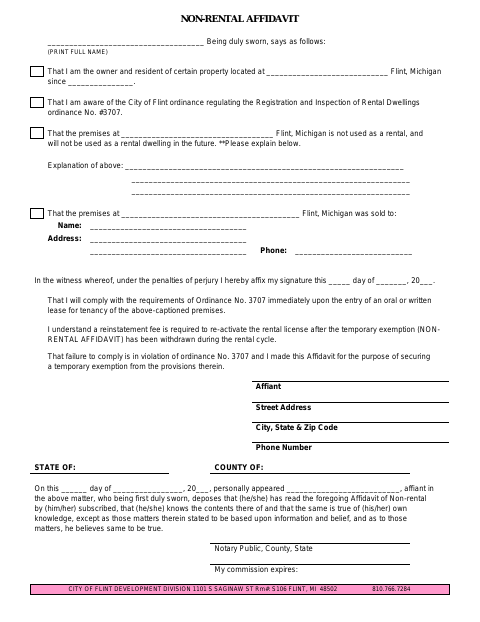
The Non-Rental Affidavit states that the owner lives at the property and that it is not, and will not be, used as a rental dwelling. The owner explains the situation, provides property and contact details, and agrees to comply with the rental ordinance if a lease begins. The form says it is made to secure a temporary exemption from the City of Flint rental-registration requirements.
Who needs it
A property owner seeking a temporary exemption from Flint's rental-registration requirements uses this affidavit to state that the property is not being used as a rental.
How to get this notarized
- 1
Download The Affidavit
Get the Non-Rental Affidavit from the City of Flint.
- 2
Fill In The Form
Provide the owner and property details, explain why the property is not a rental, and complete the applicable statements.
- 3
Book An Online Notary
Schedule a remote notarization appointment with a commissioned online notary.
- 4
- 5
Submit To The City
Send the completed affidavit to the City of Flint Development Division.
Preview the form
The blank PDF straight from Flint. Look it over, then upload your filled copy to start the notary session.

You’ll need ID and a webcam.
A licensed online notary will join you on video, verify your government-issued ID, witness your signature, and apply their seal. You’ll receive the notarized PDF by email when the session ends.
Frequently asked questions
- How do I complete the Non-Rental Affidavit?
- Fill in the property, owner, explanation, and contact details, then sign during a notarization appointment. Submit the completed affidavit to the City of Flint Development Division.
- Do I need to sign the affidavit in front of a notary?
- Yes. The form includes a jurat stating that the affiant personally appeared and was duly sworn, with spaces for the notary's signature details and commission expiration.
- Can I sign the affidavit with an online notary?
- Michigan permits remote electronic notarization by authorized notaries. Confirm with the city, village or township if unsure whether the completed affidavit can be submitted online.
- What happens if the property becomes a rental?
- The affidavit says the owner will comply with Ordinance No. 3707 when an oral or written tenancy lease begins and notes that a reinstatement fee is required to reactivate the rental license.