
Reading, MI · Hillsdale County
Security Check Report
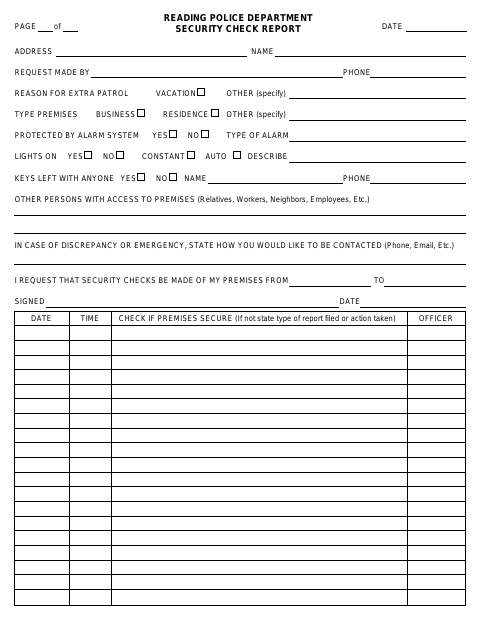
Residents use this Reading Police Department form to request extra patrols of their premises and provide information about the property and requested check dates.
What this form is
The Reading Police Department Security Check Report lets a property owner request extra patrols while premises are vacant. It records the address, requested check dates, reason, property type, alarm and lighting details, key access, and preferred emergency contact method. The form also provides spaces for officers to record check dates, times, whether the premises were secure, and any report or action taken.
Who needs it
A resident or property owner requesting extra patrols of a residence, business, or other premises can complete this report.
How to submit it
Submit it to the city department named on the form; check the city website for current contact details.
About notarization
This report is signed and dated without a notary; the signer just signs and dates it.
How to submit this form
- 1
Download the Report
Download the Security Check Report PDF.
- 2
Complete the Request
Enter the property address, reason for extra patrol, requested dates, property details, access information, and preferred emergency contact method.
- 3
Sign and Date
Sign and date the request. The document lists no attachments.
- 4
Submit the Report
Submit it to the city department named on the form; check the city website for current contact details.
Frequently asked questions
- What is the Security Check Report used for?
- It lets a person request extra patrols of premises and provide details such as the address, requested dates, property type, alarm, lighting, and emergency contact preference.
- Who can use this report?
- The form is for someone requesting security checks of premises, which may be a residence, business, or other type of property.
- Do I need a notary for the Security Check Report?
- No. The report has a signature and date field but no notary block; the signer just signs and dates it.
- How do I submit the Security Check Report?
- Submit it to the city department named on the form; check the city website for current contact details.