
Stockbridge, MI · Ingham County
Canvassers and Solicitors Permit Application
This application requests permission from the Village of Stockbridge for a person to peddle, solicit, or canvass for the present or future sale of goods or services within the village.
- licensed online notary
- ~15 min average
- Notarized PDF emailed
What you’ll need
- Government-issued photo ID
- Webcam-enabled device (laptop or phone)
- This form, ready to upload as a PDF
What this form is
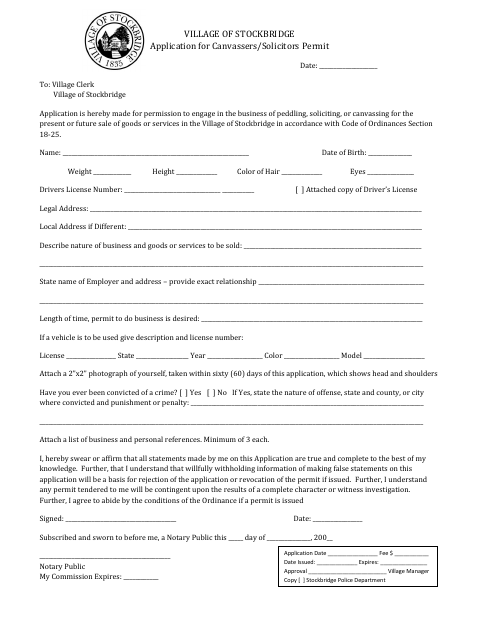
The applicant provides personal, business, vehicle, and background information, attaches a recent photograph and lists of business and personal references, and swears or affirms that the application is true and complete. The form requests permission under Village Code of Ordinances Section 18-25 and states that issuance is contingent on an investigation and agreement to follow ordinance conditions.
Who needs it
Anyone seeking permission to peddle, solicit, or canvass in the Village of Stockbridge for the present or future sale of goods or services needs this application.
Why it needs a notary
The form has a jurat reading “Subscribed and sworn to before me”; the applicant signs and swears or affirms the application before the notary.
How to get this notarized
- 1
Download The Application
Download the Village of Stockbridge Canvassers and Solicitors Permit Application.
- 2
Complete The Form
Fill in the requested personal, business, vehicle, and background information, and gather the listed attachments and references.
- 3
Book An Online Notary
Schedule a session with a commissioned online notary before signing the jurat section.
- 4
Sign On Video
Sign and swear or affirm the application during your online notarization session.
- 5
Submit To The Village
Send the notarized application and required attachments to the Village Clerk.
Preview the form
The blank PDF straight from Stockbridge. Look it over, then upload your filled copy to start the notary session.

You’ll need ID and a webcam.
A licensed online notary will join you on video, verify your government-issued ID, witness your signature, and apply their seal. You’ll receive the notarized PDF by email when the session ends.
Frequently asked questions
- How do I get the canvassers permit application notarized?
- Complete the application, then sign and swear or affirm it before a commissioned online notary. Submit the notarized application and required attachments to the Village.
- Do I need a notary for this application?
- Yes. The form includes a jurat stating that the application was subscribed and sworn to before a notary, so the applicant signs before the notary.
- Can I sign this application with an online notary?
- Michigan authorizes remote electronic notarization by a commissioned online notary. Check with the Village about its submission requirements before booking.
- What attachments does the application request?
- The form requests a recent 2-by-2-inch head-and-shoulders photograph, a copy of the applicant’s driver’s license, and at least three business and three personal references.
- Where do I submit the completed application?
- The form is addressed to the Village Clerk. For submission details or questions about the Village’s requirements, confirm with the city, village or township if unsure.