
Iron River, MI · Iron County
Marihuana Establishment License Application and Renewal
This application and its sworn supplements are for individuals and business entities seeking a new or renewed City of Iron River marihuana establishment license.
- licensed online notary
- ~15 min average
- Notarized PDF emailed
What you’ll need
- Government-issued photo ID
- Webcam-enabled device (laptop or phone)
- This form, ready to upload as a PDF
What this form is
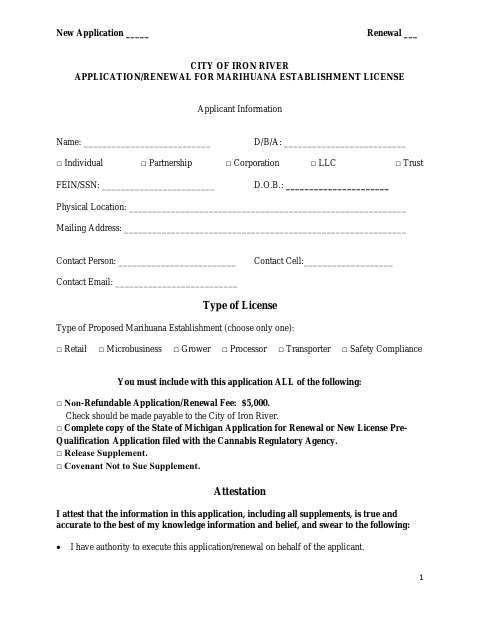
Use this four-page packet to apply for or renew a City of Iron River marihuana establishment license. Applicants select one establishment type, provide business and contact information, attest that the information is true and accurate, and submit the listed fee and supporting documents. The packet also includes a Release Supplement and Covenant Not to Sue, each with a sworn statement and notarial block.
Who needs it
An individual or business seeking a new or renewed City of Iron River marihuana establishment license must complete this application and its required supplements.
Why it needs a notary
The application and both supplements carry subscribed-and-sworn jurats; the applicant signs each statement before a commissioned online notary.
How to get this notarized
- 1
Download the Application
Download the City of Iron River application and renewal packet, including the Release Supplement and Covenant Not to Sue.
- 2
Fill In the Packet
Complete applicant, business, contact, and license-type information, then gather the listed fee and supporting documents.
- 3
Book an Online Notary
Arrange an online notarization for the sworn statements in the application and both supplements.
- 4
Sign on Video
Sign each statement during the online session when directed by the commissioned online notary.
- 5
Submit to the City
Submit the completed packet and required attachments to the City of Iron River.
Preview the form
The blank PDF straight from Iron River. Look it over, then upload your filled copy to start the notary session.

You’ll need ID and a webcam.
A licensed online notary will join you on video, verify your government-issued ID, witness your signature, and apply their seal. You’ll receive the notarized PDF by email when the session ends.
Frequently asked questions
- How do I complete the Iron River license application?
- Choose new application or renewal, fill in applicant and establishment details, select one license type, and include the fee and supporting documents listed on the form.
- Do I need to have the application notarized?
- Yes. The application, Release Supplement, and Covenant Not to Sue each include a subscribed-and-sworn jurat for the applicant.
- Can I sign the sworn statements online?
- Michigan law authorizes remote electronic notarization by a commissioned online notary. Arrange the notarial session before signing the sworn statements.
- What should I include with my application?
- The form lists a $5,000 non-refundable fee, a complete copy of the relevant state application filed with the Cannabis Regulatory Agency, the Release Supplement, and the Covenant Not to Sue Supplement.
- Where do I submit the completed packet?
- Submit the application packet to the City of Iron River. Confirm with the city, village or township if unsure about submission details.