
Greenville, MI · Montcalm County
Special Event Signs Application
Use this application to request approval for temporary signs advertising a special event sponsored by a governmental agency or nonprofit organization.
What this form is
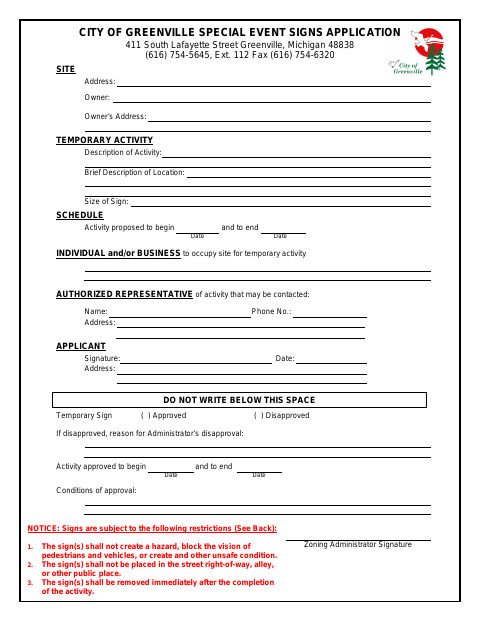
This application requests approval for temporary signs advertising a special event. It asks for the site and owner details, activity description and dates, sign size, and contact information for the applicant and an authorized representative. The form lists restrictions on sign placement, size, display period, safety, and removal after the event.
Who needs it
A person or organization seeking approval for temporary signs advertising a special event sponsored by a governmental agency or nonprofit organization should complete this application.
How to submit it
Submit it to the city department named on the form; check the city website for current contact details.
About notarization
This application is signed without a notary; the applicant signs and dates it, and no notarized attachment or sworn step is listed.
How to submit this form
- 1
Download the Application
Download the Special Event Signs Application PDF.
- 2
Complete the Application
Provide the site, owner, activity, sign, schedule, and contact details requested on the form.
- 3
Check the Sign Requirements
Review the listed restrictions for sign placement, size, display period, safety, and removal.
- 4
Submit to the City
Submit it to the city department named on the form; check the city website for current contact details.
Frequently asked questions
- What is the Special Event Signs Application for?
- It requests approval for temporary signs advertising a special event sponsored by a governmental agency or nonprofit organization.
- What information does the application ask for?
- It asks for the site and owner details, activity description and dates, sign size, and contact information for the applicant and an authorized representative.
- Do I need a notary for the Special Event Signs Application?
- No. The applicant signs and dates the application; it lists no notarized attachment or sworn step.
- How do I submit the Special Event Signs Application?
- Submit it to the city department named on the form; check the city website for current contact details.