
Vassar, MI · Tuscola County
Affidavit of Nonprofit FOIA Fee Waiver
This affidavit lets a designated nonprofit organization request a waiver of the first $20 in eligible Freedom of Information Act fees when seeking public records from the City of Vassar.
- licensed online notary
- ~15 min average
- Notarized PDF emailed
What you’ll need
- Government-issued photo ID
- Webcam-enabled device (laptop or phone)
- This form, ready to upload as a PDF
What this form is
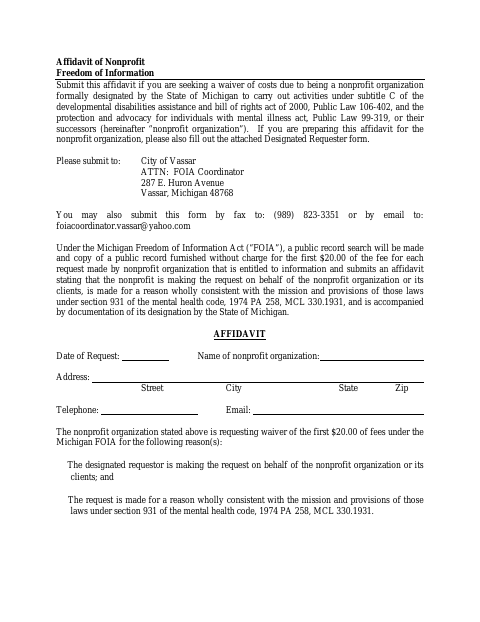
Submit this affidavit when a nonprofit organization seeks a waiver of the first $20 in eligible fees for a City of Vassar public-records request. The form asks the organization to affirm that the request is on its behalf or that of its clients and is consistent with its mission; attach documentation of the nonprofit’s designation by the State of Michigan. If someone prepares the affidavit for the organization, complete the attached Designated Requester form as well.
Who needs it
A nonprofit organization seeking the first $20 in eligible FOIA fees waived for a City of Vassar records request needs this affidavit and proof of its state designation.
How to get this notarized
- 1
Download the Affidavit
Get the Affidavit of Nonprofit FOIA Fee Waiver and review the affidavit and attached Designated Requester form.
- 2
Complete the Forms
Enter the request and nonprofit details. Complete the Designated Requester form if you are preparing the affidavit on the organization’s behalf.
- 3
Book an Online Notary
Arrange a remote notarization with a commissioned online notary before signing.
- 4
- 5
Submit to the City
Send the completed documents to the City of Vassar FOIA Coordinator by mail, fax, or email as listed on the form.
Preview the form
The blank PDF straight from Vassar. Look it over, then upload your filled copy to start the notary session.

You’ll need ID and a webcam.
A licensed online notary will join you on video, verify your government-issued ID, witness your signature, and apply their seal. You’ll receive the notarized PDF by email when the session ends.
Frequently asked questions
- How do I submit the nonprofit FOIA affidavit?
- Send the completed affidavit and documentation of the nonprofit’s State of Michigan designation to the City of Vassar FOIA Coordinator by mail, fax, or email, using the contact details on the form.
- Do I need to complete the Designated Requester form?
- Complete the attached Designated Requester form only if you are preparing the Affidavit of Nonprofit on behalf of the nonprofit organization.
- Can I have this affidavit notarized online?
- Michigan law authorizes remote electronic notarization by a commissioned online notary. Confirm with the city, village or township if unsure whether it accepts an electronically notarized affidavit.
- What supporting document must I include?
- The affidavit says you must attach documentation of the nonprofit organization’s designation by the State of Michigan.