
Detroit, MI · Wayne County
PIP No-Fault Benefits Application
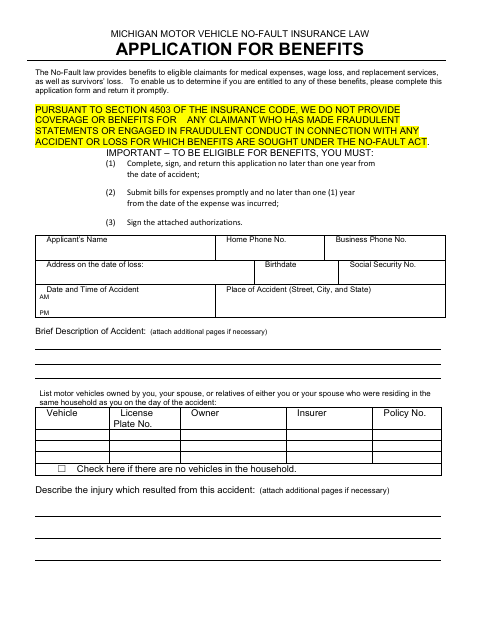
This packet combines a No-Fault insurance benefits application, supporting authorizations, and an affidavit of no insurance for people seeking PIP benefits through the City of Detroit.
- licensed online notary
- ~15 min average
- Notarized PDF emailed
What you’ll need
- Government-issued photo ID
- Webcam-enabled device (laptop or phone)
- This form, ready to upload as a PDF
What this form is
Use this packet to apply for benefits after a motor vehicle accident and provide information about your injuries, treatment, work, and expenses. It also includes medical and wage authorizations, an affidavit of no insurance requesting PIP benefits, and a health-information release; complete the sections that apply and return the application promptly as instructed.
Who needs it
People seeking PIP benefits through the City of Detroit after a motor vehicle accident may need to complete the application and applicable supporting forms.
Why it needs a notary
The affidavit of no insurance has an acknowledgment before a notary, and the health-information release has a subscribed-and-sworn jurat; the claimant signs the applicable block before the notary.
How to get this notarized
- 1
Download The Packet
Get the City of Detroit PIP No-Fault benefits application packet.
- 2
Complete Applicable Sections
Provide the requested accident, injury, treatment, household vehicle, work, and expense information, and complete applicable supporting forms.
- 3
Book An Online Notary
Arrange a remote session with a commissioned online notary for the affidavit or release block that requires notarization.
- 4
Sign On Video
Wait to sign the applicable notary block until instructed during the live video session.
- 5
Submit The Packet
Return the completed application and applicable supporting documents as instructed by the City or its claims administrator.
Preview the form
The blank PDF straight from Detroit. Look it over, then upload your filled copy to start the notary session.

You’ll need ID and a webcam.
A licensed online notary will join you on video, verify your government-issued ID, witness your signature, and apply their seal. You’ll receive the notarized PDF by email when the session ends.
Frequently asked questions
- How do I get the affidavit of no insurance notarized?
- Complete the affidavit, then sign its notary block during a live video session with a commissioned online notary. Follow the notary’s instructions and confirm submission requirements with the City.
- Do I need to notarize the entire PIP application packet?
- The packet identifies a notary block on the affidavit of no insurance and a subscribed-and-sworn block on the health-information release. The main application and other authorizations show signature lines, not notary blocks.
- Can I sign this form with a remote online notary?
- Michigan authorizes remote electronic notarization by its authorized notaries. A commissioned online notary can conduct the session by video; confirm with the city, village or township if unsure.
- What information does the application ask me to provide?
- It requests accident, injury, medical treatment, household vehicle, employment, wage, and expense information. The packet also includes medical and wage authorizations and a health-information release.