
Taylor, MI · Wayne County
Planned Unit Development Review Application
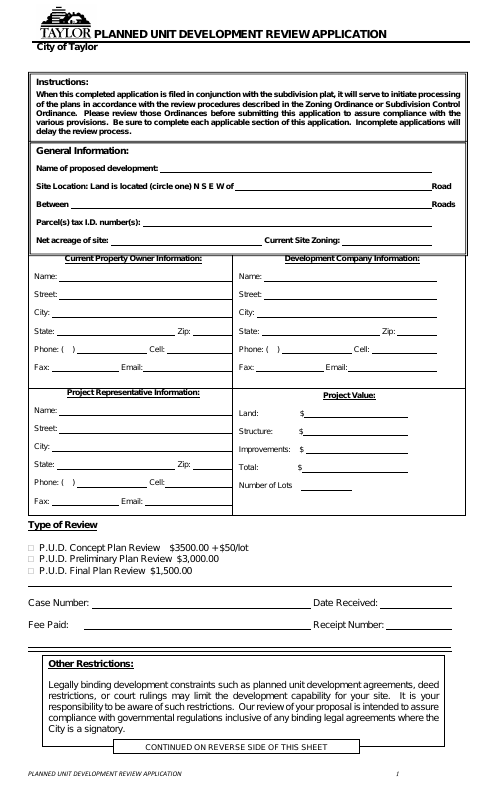
This application requests City of Taylor review of a proposed planned unit development and is filed by the property owner or authorized petitioner with project information and required plans.
- licensed online notary
- ~15 min average
- Notarized PDF emailed
What you’ll need
- Government-issued photo ID
- Webcam-enabled device (laptop or phone)
- This form, ready to upload as a PDF
What this form is
Use this application to request concept, preliminary, or final review of a proposed planned unit development in Taylor. The completed application, applicable review fee, and required site plan materials are submitted to the City; the petitioner also swears that the submitted statements and information are true and that they are authorized to submit the petition. Incomplete applications may delay review.
Who needs it
A property owner or authorized petitioner seeking City of Taylor review of a planned unit development must complete the application and provide applicable plans and fees.
How to get this notarized
- 1
Download the Application
Get the Planned Unit Development Review Application and review its instructions and plan requirements.
- 2
Complete the Form
Fill in the applicable property, project, petitioner, and review information, and prepare the required plans and fee.
- 3
Book an Online Notary
Schedule a session with a commissioned online notary for the petitioner affidavit.
- 4
- 5
Submit to the City
Submit the completed application with the applicable fee and required site plan materials to the City of Taylor.
Preview the form
The blank PDF straight from Taylor. Look it over, then upload your filled copy to start the notary session.

You’ll need ID and a webcam.
A licensed online notary will join you on video, verify your government-issued ID, witness your signature, and apply their seal. You’ll receive the notarized PDF by email when the session ends.
Frequently asked questions
- How do I get the petitioner affidavit notarized online?
- Complete the application, then book a commissioned online notary. The petitioner signs the affidavit during a video session, and the notary completes the jurat.
- Do I need to notarize the project representative’s signature?
- The form’s notary block appears under the petitioner affidavit and calls for the petitioner to be sworn. The project representative also signs the application, but that signature is not identified in the form as notarized.
- What should I submit with this application?
- The form says the application must be accompanied by the applicable review fee and a complete site plan. Check the requirements for the selected review type and include the requested plans and information.
- Can I use an online notary for this form?
- Michigan permits remote electronic notarization by a commissioned online notary. If you are unsure whether the City will accept a remotely notarized affidavit, confirm with the city, village or township if unsure.