
Ham Lake, MN · Anoka County
Mobile Food Truck and Trailer Vending License Application
This application is for food truck, trailer, and stand operators seeking an annual City of Ham Lake license to sell food and drinks to the public.
- licensed online notary
- ~15 min average
- Notarized PDF emailed
What you’ll need
- Government-issued photo ID
- Webcam-enabled device (laptop or phone)
- This form, ready to upload as a PDF
What this form is
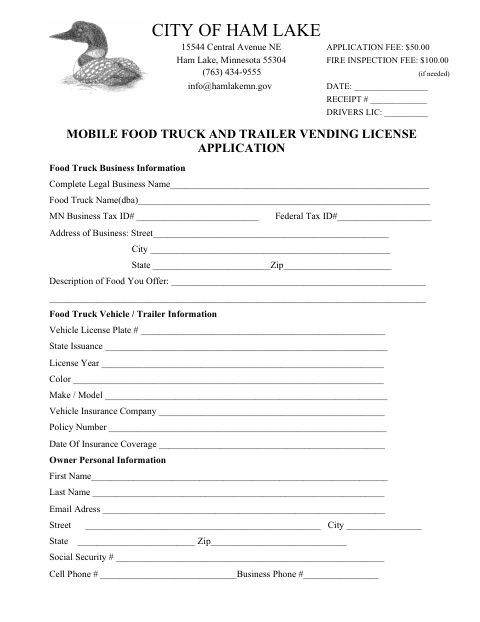
The application collects business, vehicle, owner, insurance, and workers’ compensation information, and includes a background-check consent form with an individual acknowledgment. Ham Lake requires an annual city license for mobile food trucks, trailers, and stands selling food or drinks to the public. Applicants must provide the required county health license and proof of a passed current-year fire inspection, along with the other listed documents and fees.
Who needs it
Food truck, trailer, or stand operators who plan to sell food or drinks to the public in Ham Lake need to apply for the annual city license.
Why it needs a notary
The background-check consent includes an individual acknowledgment block; the named applicant signs the consent before a notary public.
How to get this notarized
- 1
Download The Application
Get the Mobile Food Truck and Trailer Vending License Application from the City of Ham Lake.
- 2
Complete The Application
Fill in the business, vehicle, owner, insurance, and workers’ compensation information, and gather the listed supporting documents.
- 3
Book An Online Notary
Schedule an online notarization for the background-check consent acknowledgment.
- 4
Sign On Video
Meet with the commissioned online notary and sign the consent when instructed.
- 5
Submit To The City
Submit the completed application, notarized consent, required documents, and fees to the City of Ham Lake.
Preview the form
The blank PDF straight from Ham Lake. Look it over, then upload your filled copy to start the notary session.

You’ll need ID and a webcam.
A licensed online notary will join you on video, verify your government-issued ID, witness your signature, and apply their seal. You’ll receive the notarized PDF by email when the session ends.
Frequently asked questions
- How do I get the background-check consent notarized?
- Complete the consent fields, then meet with a commissioned online notary by video. Sign the consent when directed during the notarization.
- Do I need to notarize the entire license application?
- The form’s notary block appears in the background-check consent and calls for an individual acknowledgment. Follow the city’s instructions for the remaining application sections.
- Can I use online notarization for this form?
- Minnesota law authorizes remote online notarization by a commissioned online notary, and recognizes notarial acts performed by an authorized officer of another state. Confirm with the city if unsure.
- What documents does the application checklist require?
- The checklist includes the completed application, fee payment, identification copy, background consent, Department of Health certificate, valid fire inspection, workers’ compensation form, and data privacy advisory.