
Ramsey, MN · Anoka County
New Liquor License Application
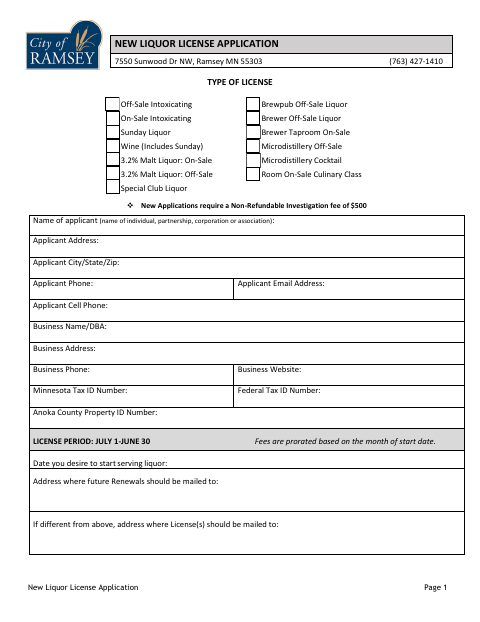
This 18-page application is for individuals and businesses seeking a new liquor license from the City of Ramsey, with applicant details, business information, ownership interests, and sworn statements.
- licensed online notary
- ~15 min average
- Notarized PDF emailed
What you’ll need
- Government-issued photo ID
- Webcam-enabled device (laptop or phone)
- This form, ready to upload as a PDF
What this form is
The application asks for the requested license type, applicant and business details, ownership and financial interests, and a description of the proposed business. It also includes a sworn applicant certification and a separate sworn statement for certain 3.2 malt liquor license applicants seeking a dram shop insurance exemption. The packet requests supporting materials such as a lease, floor plans, insurance information, and background-check details; new applications require a nonrefundable $500 investigation fee.
Who needs it
An individual or business applying to the City of Ramsey for a new liquor license should complete the application and provide the requested supporting information.
Why it needs a notary
The applicant signs the sworn certification on page 3 before a notary; eligible 3.2 malt liquor applicants also sign the page 4 dram shop exemption statement before a notary.
How to get this notarized
- 1
Download The Application
Get the City of Ramsey’s new liquor license application packet.
- 2
Complete The Application
Fill in applicant, business, ownership, financial-interest, and proposed-business details, and gather any supporting documents requested.
- 3
Book An Online Notary
Schedule a session with a commissioned online notary for the sworn statement or statements that apply to your application.
- 4
Sign On Video
Sign the applicable statement in the online notary’s presence during the video session.
- 5
Submit To The City
Submit the completed packet, notarized pages, supporting materials, and required investigation fee to the City of Ramsey.
Preview the form
The blank PDF straight from Ramsey. Look it over, then upload your filled copy to start the notary session.

You’ll need ID and a webcam.
A licensed online notary will join you on video, verify your government-issued ID, witness your signature, and apply their seal. You’ll receive the notarized PDF by email when the session ends.
Frequently asked questions
- How do I get the application notarized online?
- Complete the application first, then book with a commissioned online notary. Sign the sworn certification during the video session, and include the notarized page with your application.
- Do I need to notarize the dram shop exemption statement?
- The page 4 statement includes a notary block. It applies to applicants certifying they applied for a 3.2 liquor license and meet the stated sales limits.
- Can a commissioned online notary notarize this form?
- Minnesota authorizes remote online notarization for its own notaries under the Remote Online Notarization Act, Minn. Stat. §358.645. Confirm with the city if unsure whether it will accept an online-notarized application.
- What supporting materials does the application request?
- Depending on the application, the packet requests items such as a lease, preliminary plans or floor plans, an Anoka County Health Department license for prepared food, and liquor liability insurance information.
Other forms in Ramsey
New Liquor License Application in other Minnesota cities
Each city publishes its own version of this form. Pick the city where you’re filing.