
Watson, MN · Chippewa County
Affidavit of Candidacy
This affidavit records a candidate’s identifying information and sworn eligibility affirmations for filing with the appropriate election filing officer when seeking public office.
- licensed online notary
- ~15 min average
- Notarized PDF emailed
What you’ll need
- Government-issued photo ID
- Webcam-enabled device (laptop or phone)
- This form, ready to upload as a PDF
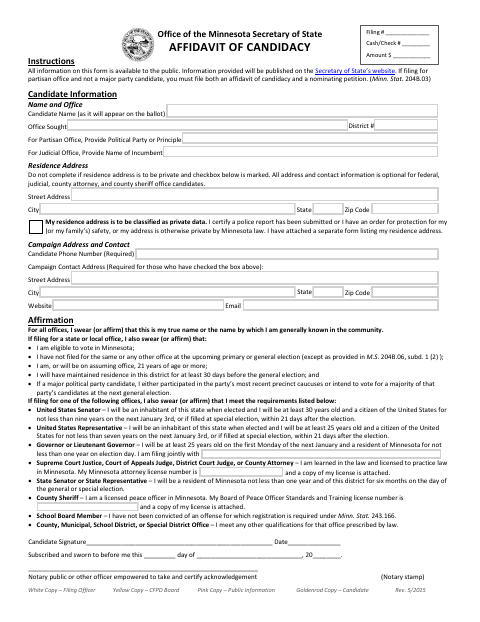
What this form is
Candidates use this form to provide the name and office they seek, contact details, and affirmations about their identity and eligibility. The form includes additional statements for certain offices and a place to identify a private residence address when applicable. A candidate seeking a municipal office may use it when filing for that office; the form directs certain non-major-party candidates seeking partisan office to file a nominating petition as well.
Who needs it
A person filing to run for public office, including a municipal office, needs this form to provide candidate information and affirm eligibility.
Why it needs a notary
The form has a “Subscribed and sworn to before me” jurat; the candidate signs and swears or affirms the statements before the notary.
How to get this notarized
- 1
Download the Affidavit
Download the affidavit of candidacy and review its instructions and candidate information fields.
- 2
Fill In Your Information
Enter the office sought, candidate details, and applicable eligibility affirmations. Leave the signature for your notary appointment.
- 3
Book an Online Notary
Schedule a video appointment with a commissioned online notary.
- 4
Sign on Video
Sign and swear or affirm the form in the notary’s presence during the video session.
- 5
Submit to the Filing Officer
Submit the completed affidavit to the appropriate filing officer and check for any additional filing requirements.
Preview the form
The blank PDF straight from Watson. Look it over, then upload your filled copy to start the notary session.

You’ll need ID and a webcam.
A licensed online notary will join you on video, verify your government-issued ID, witness your signature, and apply their seal. You’ll receive the notarized PDF by email when the session ends.
Frequently asked questions
- How do I get my affidavit of candidacy notarized online?
- Complete the form, then book a video appointment with a commissioned online notary. Sign and swear or affirm the statements during the session, and submit the notarized affidavit to the appropriate filing officer.
- Do I need to sign the affidavit in front of a notary?
- Yes. The form includes a “Subscribed and sworn to before me” jurat, so sign and swear or affirm the statements before the notary.
- Can I use a commissioned online notary for this form?
- Minnesota authorizes remote online notarization by its notaries under Minn. Stat. §358.645, and Minn. Stat. §358.61 recognizes notarial acts by authorized officers of another state. Confirm with the city if unsure.
- Where do I submit the completed affidavit?
- The form identifies the filing officer as the recipient of the white copy. Check with the appropriate filing officer about how and where to submit your completed affidavit.
Affidavit of Candidacy in other Minnesota cities
Each city publishes its own version of this form. Pick the city where you’re filing.