
International Falls, MN · Koochiching County
Body Worn Camera Request Form
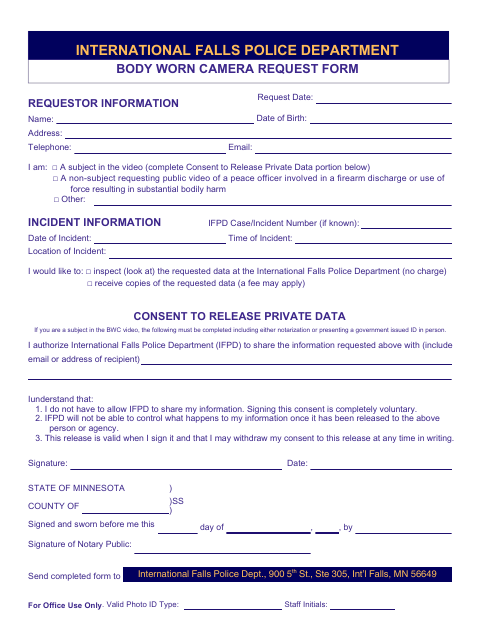
This form lets people request to inspect or receive copies of International Falls Police Department body-worn camera data and provides consent for release of private data when required.
- licensed online notary
- ~15 min average
- Notarized PDF emailed
What you’ll need
- Government-issued photo ID
- Webcam-enabled device (laptop or phone)
- This form, ready to upload as a PDF
What this form is
Use this form to request International Falls Police Department body-worn camera data by inspection or copies, which may involve a fee. Provide incident and requestor information, identify the recipient if authorizing release, and select the applicable request type. If you are a subject in the video and consent to release private data, complete that section; the form requires notarization or presentation of a government-issued ID in person.
Who needs it
Anyone requesting to inspect or receive copies of body-worn camera data from the International Falls Police Department should complete this form.
Why it needs a notary
The consent section has a Minnesota state jurat; a subject in the video signing consent must sign before the notary or present government-issued ID in person.
How to get this notarized
- 1
Download The Form
Get the Body Worn Camera Request Form from the International Falls Police Department.
- 2
Fill In The Request
Add your contact and incident details, select inspection or copies, and complete the consent section if you are a subject in the video seeking release of private data.
- 3
Book An Online Notary
If notarization is required for your consent, book a commissioned online notary; the form also permits presenting government-issued ID in person.
- 4
Sign On Video
If using online notarization, sign the consent during the notary’s video session and complete the jurat.
- 5
Submit To The Police Department
Send the completed form to the International Falls Police Department using its submission instructions.
Preview the form
The blank PDF straight from International Falls. Look it over, then upload your filled copy to start the notary session.

You’ll need ID and a webcam.
A licensed online notary will join you on video, verify your government-issued ID, witness your signature, and apply their seal. You’ll receive the notarized PDF by email when the session ends.
Frequently asked questions
- How do I request body-worn camera data?
- Complete the form with your contact and incident information, choose inspection or copies, and send it to the International Falls Police Department as directed on the form.
- Do I need to notarize this form?
- Only if you are a subject in the video and complete the consent to release private data. The form also allows you to present a government-issued ID in person instead.
- Can I sign the consent with a commissioned online notary?
- Minnesota authorizes remote online notarization for its own notaries under Minn. Stat. §358.645. Confirm with the city if unsure whether it accepts a remotely notarized consent.
- Can I request copies instead of inspecting the data?
- Yes. The form lets you choose to inspect the requested data at the police department at no charge or receive copies; a fee may apply for copies.