
Litchfield, MN · Meeker County
Façade Contract
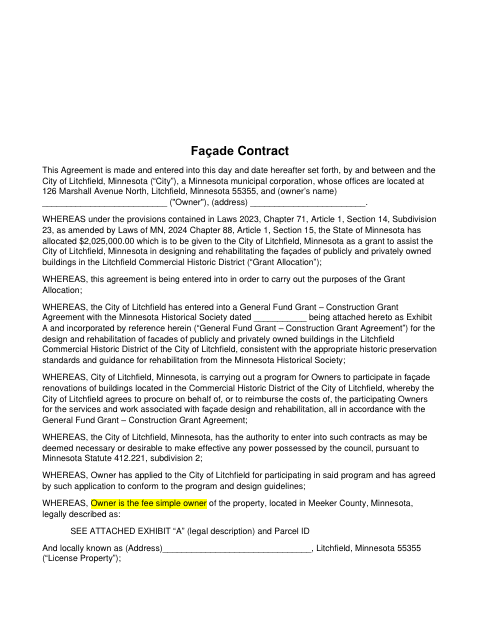
This agreement sets the terms for façade design and rehabilitation grant work, and is signed by property owners participating in Litchfield’s Commercial Historic District program and the city.
- licensed online notary
- ~15 min average
- Notarized PDF emailed
What you’ll need
- Government-issued photo ID
- Webcam-enabled device (laptop or phone)
- This form, ready to upload as a PDF
What this form is
The contract sets out the owner’s façade license, project responsibilities, insurance and maintenance obligations, and the conditions tied to the City’s grant-supported rehabilitation program. It applies to participating owners whose property is in the Litchfield Commercial Historic District and whose project the City has approved. The agreement also provides for a declaration concerning the property’s restrictions and for the City to record the contract or a memorandum of it.
Who needs it
Property owners with an approved façade project in Litchfield’s Commercial Historic District sign this agreement with the City as part of the grant program.
Why it needs a notary
The form includes acknowledgment blocks for the owner and City Administrator, plus a declaration acknowledgment; each applicable signer acknowledges the instrument before a notary.
How to get this notarized
- 1
Download The Agreement
Download the Façade Contract and review the agreement and its exhibits.
- 2
Complete The Required Details
Fill in owner, property, project, term, and other applicable information. Attach or complete the required legal description and declaration details.
- 3
Book An Online Notary
Arrange an appointment with a commissioned online notary for the applicable acknowledgment blocks.
- 4
Sign On Video
The applicable signers appear by video and acknowledge the completed document before the notary.
- 5
Submit To The City
Send the signed agreement and applicable exhibits to the City as directed for the façade program.
Preview the form
The blank PDF straight from Litchfield. Look it over, then upload your filled copy to start the notary session.

You’ll need ID and a webcam.
A licensed online notary will join you on video, verify your government-issued ID, witness your signature, and apply their seal. You’ll receive the notarized PDF by email when the session ends.
Frequently asked questions
- How do I get the Façade Contract notarized?
- Complete the agreement and arrange for each applicable signer to acknowledge it before a notary. Book a video appointment with a commissioned online notary, then submit the completed agreement as directed by the City.
- Do I need to notarize the owner and City signature blocks?
- The form includes acknowledgment blocks for both the owner and the City Administrator, as well as a separate acknowledgment in Exhibit B. Check which signature blocks apply to your completed documents.
- Can I sign this agreement with an online notary?
- Minnesota authorizes remote online notarization for its own notaries under the Remote Online Notarization Act, Minn. Stat. §358.645. Minnesota law also recognizes notarial acts performed by a notary public or other authorized officer of another state under Minn. Stat. §358.61.
- How is the Façade Contract recorded?
- The agreement says the City shall record the contract or a memorandum of it, along with a declaration and amendments. Documents headed to a county recorder may be e-recorded where supported, usually through a title company; confirm with the city if unsure.