
Woodbury, MN · Washington County
On-Sale Intoxicating Liquor License Application
This application requests a Woodbury liquor license and is filed by a business or individual seeking an on-sale intoxicating liquor license, with supporting materials required for city review.
- licensed online notary
- ~15 min average
- Notarized PDF emailed
What you’ll need
- Government-issued photo ID
- Webcam-enabled device (laptop or phone)
- This form, ready to upload as a PDF
What this form is
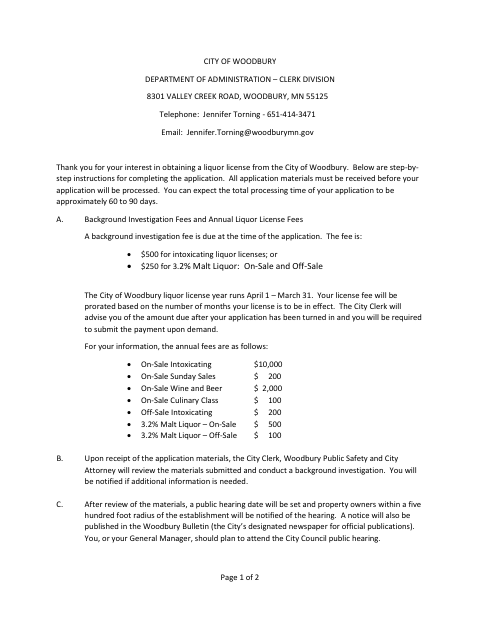
Woodbury’s application collects details about the applicant, business, ownership, premises, managers, and insurance, and includes related forms and instructions. The city reviews the submitted materials, conducts a background investigation, and sets a public hearing; the instructions estimate processing takes about 60 to 90 days and say all application materials must be received before processing begins.
Who needs it
An individual or business seeking a Woodbury on-sale intoxicating liquor license should complete the application and provide the supporting materials required for its applicant type.
Why it needs a notary
The application has a notary acknowledgment for the applicant’s signature, and Part II has a subscribed-and-sworn jurat for each person completing that personal history form.
How to get this notarized
- 1
Download the Application
Download Woodbury’s on-sale intoxicating liquor license application and review its instructions and required supporting materials.
- 2
Complete the Forms
Fill in the applicable applicant and business sections, complete required Part II personal history forms, and gather supporting documents.
- 3
Book an Online Notary
Schedule a session with a commissioned online notary for the signature or sworn sections that include notary blocks.
- 4
Sign on Video
Show identification and sign or swear to the relevant sections during the online notarization session.
- 5
Submit to the City
Send the completed application and required materials to the City of Woodbury as instructed in the form.
Preview the form
The blank PDF straight from Woodbury. Look it over, then upload your filled copy to start the notary session.

You’ll need ID and a webcam.
A licensed online notary will join you on video, verify your government-issued ID, witness your signature, and apply their seal. You’ll receive the notarized PDF by email when the session ends.
Frequently asked questions
- How do I get the application notarized online?
- Complete the form but wait to sign the applicant signature and sworn personal history sections. Book with a commissioned online notary, show identification, and sign or swear to the applicable statements during the video session.
- Do I need to notarize every page?
- The form shows a notary acknowledgment for the applicant signature and a subscribed-and-sworn jurat on Part II personal history forms. Not every page has a notary block; confirm with the city if unsure.
- Can a commissioned online notary notarize this form?
- Minnesota authorizes remote online notarization for its notaries under Minn. Stat. §358.645, and Minn. Stat. §358.61 recognizes notarial acts by authorized officers of another state. Check with the city about accepting a remotely notarized application.
- What happens after I submit the application?
- The city says the Clerk, Public Safety, and City Attorney review the materials and conduct a background investigation. A public hearing is then set, and the applicant or general manager should plan to attend.
Other forms in Woodbury
Off- and On-Sale Malt Beverage Liquor License Application
Woodbury
Massage Therapist License Application
Woodbury
Massage Therapy Business License Application
Woodbury
Massage Therapy License Verification Release Form
Woodbury
Off-Sale Intoxicating Liquor License Application
Woodbury
On-Sale Wine and Liquor License Application
Woodbury
On-Sale Intoxicating Liquor License Application in other Minnesota cities
Each city publishes its own version of this form. Pick the city where you’re filing.