
Hattiesburg, MS · Forrest County
Golf Cart / Low-Speed Vehicle Registration
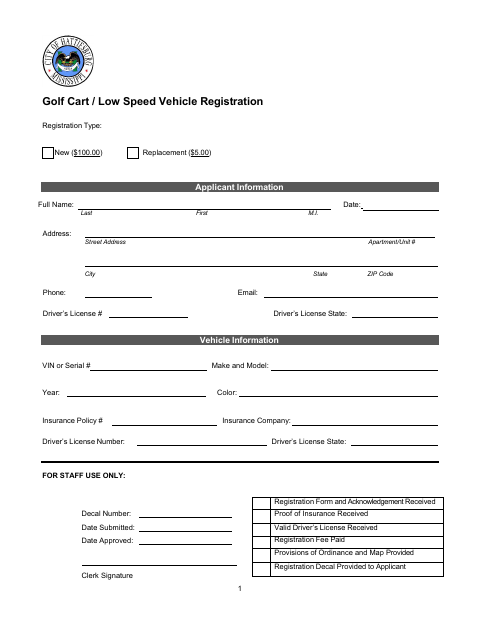
Hattiesburg residents use this form to register a golf cart or low-speed vehicle, provide vehicle and insurance details, and acknowledge the city’s operating and safety requirements.
- licensed online notary
- ~15 min average
- Notarized PDF emailed
What you’ll need
- Government-issued photo ID
- Webcam-enabled device (laptop or phone)
- This form, ready to upload as a PDF
What this form is
The two-page form collects applicant, vehicle, insurance, and driver’s-license information for a new registration or replacement decal. The applicant acknowledges receiving information about permitted operating areas and agreeing to comply with Ordinance 3316, and attests that the vehicle has the listed safety equipment. The form includes staff-use fields for the decal, submission, approval, and required documentation, along with an acknowledgment section for the applicant’s signature.
Who needs it
A Hattiesburg applicant seeking a new golf cart or low-speed vehicle registration or replacement decal should complete the form and provide the requested vehicle, insurance, and license information.
Why it needs a notary
The form carries a State of Mississippi acknowledgment block, and the applicant signs the acknowledgment before the notary after completing the certification.
How to get this notarized
- 1
Download the Form
Get the Hattiesburg Golf Cart / Low-Speed Vehicle Registration form.
- 2
Complete the Form
Enter applicant and vehicle details, including insurance and driver’s-license information, and review the acknowledgment.
- 3
Book an Online Notary
Arrange a session with a commissioned online notary and confirm the city will accept the notarized form.
- 4
Sign on Video
Follow the notary’s instructions and sign the acknowledgment during the online session.
- 5
Submit to the City
Submit the signed form with the required proof of insurance, valid driver’s license, and fee.
Preview the form
The blank PDF straight from Hattiesburg. Look it over, then upload your filled copy to start the notary session.

You’ll need ID and a webcam.
A licensed online notary will join you on video, verify your government-issued ID, witness your signature, and apply their seal. You’ll receive the notarized PDF by email when the session ends.
Frequently asked questions
- How do I complete the golf cart registration form?
- Fill in the applicant, vehicle, insurance, and driver’s-license information. Sign the acknowledgment before a notary, then submit the completed form and required items to the city.
- Do I need to sign the acknowledgment before a notary?
- The form includes a notary acknowledgment block and says to sign in the presence of the clerk. Check with the city about its signing and submission instructions before signing.
- Can I use an online notary for this form?
- Mississippi does not authorize notaries commissioned in Mississippi to notarize remotely. Mississippi law recognizes qualifying notarial acts performed by an officer authorized in another state; a commissioned online notary may be an option. Confirm acceptance with the city before booking.
- What should I include with the registration form?
- The form lists proof of insurance, a valid driver’s license, and the registration fee among the items for staff to check. Confirm with the city or chancery clerk if unsure.