
Biloxi, MS · Harrison County
Live Entertainment/Amplified Sound Permit Request
This two-page request seeks a Biloxi permit for live entertainment or amplified sound and is completed by the event applicant, who must sign and notarize the second page.
- licensed online notary
- ~15 min average
- Notarized PDF emailed
What you’ll need
- Government-issued photo ID
- Webcam-enabled device (laptop or phone)
- This form, ready to upload as a PDF
What this form is
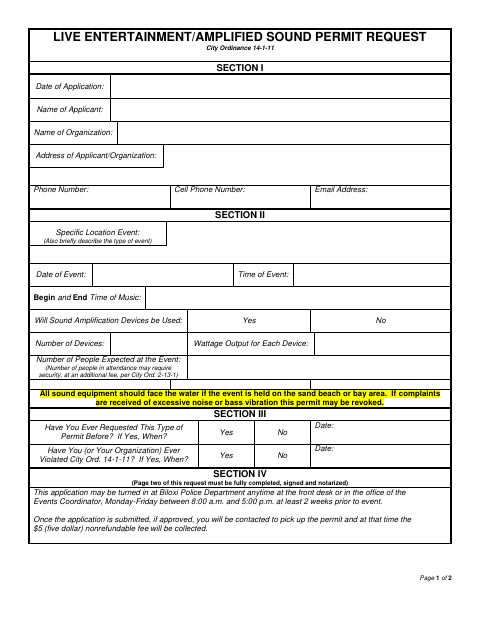
Use this form to request permission for a live entertainment event or amplified sound in Biloxi. It asks for applicant and organization details, event location and timing, sound equipment information, expected attendance, and prior permit or ordinance history. The applicant must complete and notarize page two, which includes a waiver and certification. Submit the completed application to the Biloxi Police Department at least two weeks before the event; the form says approved applicants will be contacted about permit pickup and the fee.
Who needs it
An individual applying to hold live entertainment or use amplified sound at an event in Biloxi must complete and submit this request.
Why it needs a notary
The form carries a State of Mississippi jurat-style block stating the applicant appeared, was duly sworn, and acknowledged the instrument; the applicant signs before the notary.
How to get this notarized
- 1
Download the Form
Get the two-page Live Entertainment/Amplified Sound Permit Request from the City of Biloxi.
- 2
Complete Both Pages
Provide applicant, organization, event, sound equipment, and prior permit information; read the waiver and certification.
- 3
Book an Online Notary
Check with the city about acceptance, then arrange a commissioned online notary for the applicant’s notarized statement.
- 4
Sign Before the Notary
The applicant appears before the notary, takes the required oath, and signs the form as directed.
- 5
Submit to the City
Submit the completed application to the Biloxi Police Department at least two weeks before the event.
Preview the form
The blank PDF straight from Biloxi. Look it over, then upload your filled copy to start the notary session.

You’ll need ID and a webcam.
A licensed online notary will join you on video, verify your government-issued ID, witness your signature, and apply their seal. You’ll receive the notarized PDF by email when the session ends.
Frequently asked questions
- How do I submit the amplified sound permit request?
- Complete both pages and submit the application to the Biloxi Police Department front desk or Events Coordinator’s office at least two weeks before the event.
- Do I need to have the applicant statement notarized?
- Yes. The form says page two must be fully completed, signed, and notarized. The applicant signs the waiver and certification and appears before the notary for the oath and acknowledgment.
- Can I sign this form with an online notary?
- Mississippi has not authorized its own notaries to notarize remotely; they must be physically with the signer. Mississippi recognizes qualifying notarial acts performed by an authorized officer of another state. Confirm acceptance with the city before booking a commissioned online notary.
- What if I am unsure whether the city will accept my notarization?
- The form directs applicants to the Biloxi Police Department. Ask the city about its submission requirements; confirm with the city or chancery clerk if unsure.